.png?width=96&name=image%20(9).png)

|
Key Takeaways:
|
What is Intuit Intelligence?
Intuit Intelligence is an AI-powered feature in QuickBooks that allows users to ask financial questions in plain language and receive instant answers, summaries, and insights based on their accounting data.
Instead of running reports manually, you can ask questions like:
- What was my profit last month?
- How have my expenses changed?
- What’s my projected cash flow?
It analyzes the data already in QuickBooks and turns it into conversational insights, making financial visibility faster and more accessible.
Does it make a difference?
Remember staring at QuickBooks at 11pm, clicking through five reports just to answer one question? That’s exactly the problem Intuit Intelligence solves.
For ecommerce operators especially, faster access to financial insights means:
- Quicker decisions
- Less reliance on manual reporting
- More confidence in day-to-day operations
But there’s a catch most people don’t talk about. AI is only as smart as the data behind it. And for businesses juggling multiple channels, marketplace fees, and messy payouts, that data is rarely as clean as it needs to be
In this blog, we’ll break down what Intuit Intelligence can actually do and where it falls short.
10 things you can do with Intuit Intelligence
1. Ask for your profitability instantly
Type "What was my profit last month?" and get an answer without opening a single report. For business owners who used to spend 20 minutes navigating P&L screens, this is a real quality-of-life upgrade.
Great for quick visibility and building a habit of reviewing financials regularly.
Suggested read: 10 Common Accounting Errors and Mistakes to Avoid in Small Business
2. Analyze revenue trends
Intuit Intelligence can pull revenue data over time and surface growth patterns, where you're trending up, where things dipped, and when your strongest periods tend to be.
Useful for planning marketing spend and inventory management.
3. Identify expense patterns
Rather than scrolling through transaction lists, you can ask the AI to surface where your spending is going, and whether it's changing.
Example: Spotting a 30% increase in software costs without digging through transactions.
4. Forecast cash flow
Cash flow forecasting becomes more accessible with AI.
You can:
- Predict your future cash position
- Plan for upcoming expenses
- Prepare for growth investments
Especially useful for inventory purchases or hiring.
5. Detect unusual transactions
AI is well-suited for anomaly detection, and Intuit Intelligence uses that capability to flag transactions that look out of place. A duplicate charge, an unexpectedly large expense, or an unusual vendor payment can surface early.
6. Break down performance by category
You can ask the AI to analyze performance by product category, revenue stream, or expense type.
Useful but depends heavily on how cleanly your transactions have been categorized inside QuickBooks.
7. Simplify tax insights
For most businesses, Intuit Intelligence can estimate your tax obligations, surface your deductible expenses, and give you a clearer picture of your liabilities ahead of filing.
Where it gets tricky is businesses with complex product-specific tax rules, different rates across categories like supplements, apparel, or bundled products, where the AI doesn't always have the granularity to get it right.
Works well for standard setups but struggles with complex product-level tax rules.
Suggested read: The Future of Ecommerce Accounting: Leverage AI for Ecommerce Automation
8. Generate financial summaries automatically
Instead of manually assembling a monthly summary, you can prompt the AI to produce one. Revenue, expenses, key variances, formatted and ready to share with a partner, investor, or advisor.
Saves time for founders and finance teams.
9. Get instant answers without waiting on reports
Self-serve access to financial insights means you don't have to schedule time with your accountant every time you want a number.
Faster answers = faster business decisions.
10. Speed up month-end close
AI can help summarize financials and streamline parts of the closing process.
But this is where reality hits for most ecommerce businesses…
Where Intuit Intelligence starts to struggle
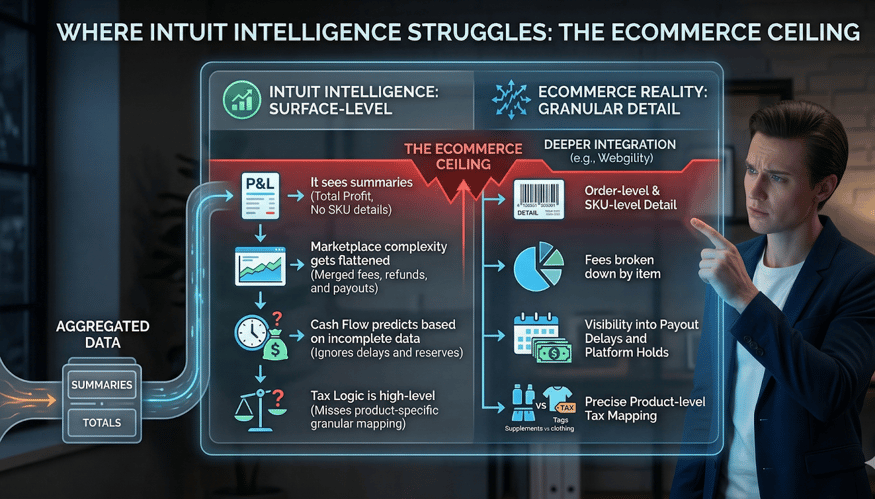
Where Intuit Intelligence falls short for ecommerce and why deeper, order-level data matters.
The capabilities above are real. But for ecommerce businesses, there's a consistent pattern: the AI performs well at a surface level, then hits a ceiling. Here's why.
1. It works on summary, not transaction-level detail
AI works on what’s already in your accounting system. If your data is aggregated, your insights stay high-level.
Example:
You can see total profit, but not which SKUs are actually driving it. This is the core data gap in most ecommerce setups: the books reflect totals, not transactions.
2. Marketplace complexity gets flattened
Selling on Amazon, Shopify, Walmart, or multiple channels means your financial data includes platform fees, referral charges, FBA costs, refunds, chargebacks, partial payouts, and rolling reserves. When this data enters QuickBooks as a single summarized entry, all of that structure disappears.
Result:
AI can’t fully explain where your margins are leaking because the transaction detail that would answer that question was never captured at the right level.
3. Cash flow is not the ecommerce reality
Intuit Intelligence forecasts cash flow based on what's recorded in your accounting system. But ecommerce cash flow is shaped by factors that don't always surface clearly in the books: payout delays, platform holding periods, rolling reserves, and timing mismatches between sales and deposits.
Reality check:
If those timing differences aren't recorded accurately, Intuit Intelligence’s forecast describes a version of your cash position that doesn't match your bank account.
4. Tax logic requires SKU-level data the AI doesn't have
Tax rules in ecommerce are not one-size-fits-all. Supplements, clothing, digital goods, and bundled products can each carry different tax treatments across different states. Without SKU-level tax mapping in your books, Intuit Intelligence can produce tax estimates but it cannot confirm whether those estimates are based on the right product-level classifications.
Result:
Either under-collection (a compliance risk) or over-collection (a customer experience problem).
Intuit Intelligence vs ecommerce reality
|
Capability |
Works Well |
Where It Breaks |
|
Profit insights |
High-level P&L |
No SKU-level visibility |
|
Revenue trends |
Historical analysis |
No channel-level clarity |
|
Expense tracking |
Categorized spend |
Misses detailed marketplace fees |
|
Cash flow forecast |
Based on records |
Ignores payout delays/reserves |
|
Tax insights |
Standard setups |
Weak for product-level tax rules |
Smarter answers start with better data
Intuit Intelligence is a genuine capability, not just a feature announcement. But it is, at its core, an interface on top of whatever data you've put into QuickBooks. The AI does not fix incomplete records. It reads them.
What Intuit Intelligence can do:
- Summarize financial data quickly and in plain language
- Surface patterns, anomalies, and trends from recorded transactions
- Answer high-level financial questions on demand
What Intuit Intelligence cannot do:
- Fix aggregated or incomplete transaction data
- Reconnect sales activity that was never recorded at the order level
- Untangle fees, refunds, and adjustments that were posted as one lump sum
For ecommerce businesses, this gap is structural, not exceptional. The businesses that get the most value from AI-powered accounting aren't simply the ones who turn the feature on. They're the ones who ensure the data underneath it is accurate, complete, and recorded at the right level of detail.
This is the problem Webgility was built to solve
Most ecommerce connectors sync data. Webgility goes beyond sync by ensuring:
- Order-level and SKU-level data synced into QuickBooks, making it easy to understand true profitability and margins
- Automating reconciliation of payouts, fees, and transactions so financials stay accurate and teams get faster, clearer visibility
- Connecting ecommerce and accounting data across channels to eliminate manual work and keep numbers consistent
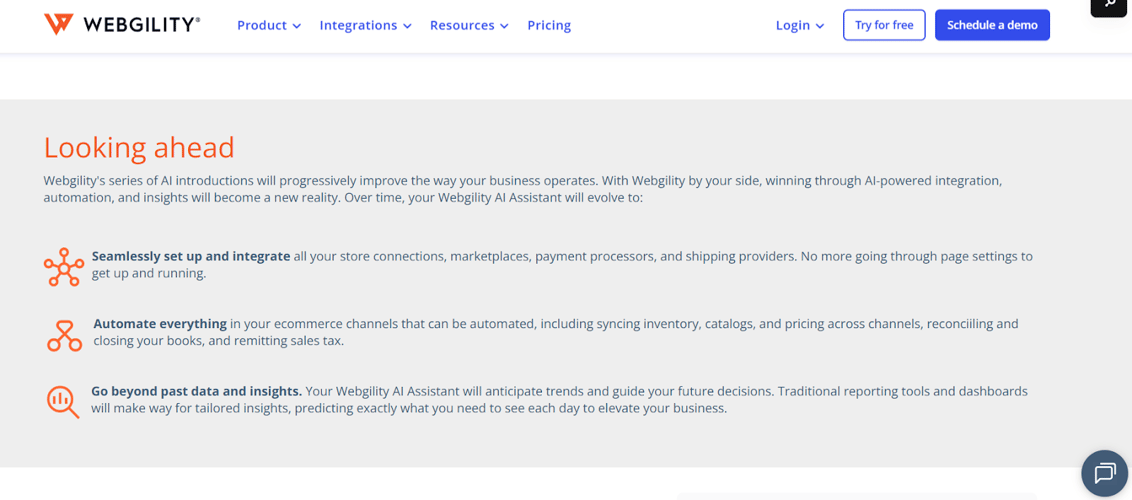 Webgility AI – Automating integrations, reconciliation, and insights for smarter ecommerce operations
The difference matters specifically in the context of AI-powered accounting. When Intuit Intelligence asks what your business means, it can only answer that question if the data underneath it is order-level, SKU-level, and fee-attributed.
Summary-level books: the output of most basic connectors cannot answer the question, no matter how intelligent the AI on top.
Webgility connects 70+ platforms: Shopify, Amazon, Walmart, WooCommerce, and more to QuickBooks with reconciliation that explains where the money actually went: fees broken out by type, refunds tracked accurately, inventory and COGS kept aligned, and real-world exceptions, such as partial shipments, refund timing mismatches, rolling reserves handled so they don't distort the picture.
|
Success story: BeeCure, a health and wellness brand selling across Shopify and Amazon, was spending hours each month manually reconciling data across channels. After moving to Webgility, they recovered 40 hours a month, not by getting a better AI layer, but by getting the right data flowing into QuickBooks in the first place. |
FAQs
How does Intuit Intelligence work?
Intuit Intelligence interprets natural language queries and retrieves answers from the financial data already recorded in your QuickBooks account.
Is Intuit Intelligence available to all QuickBooks users?
Availability depends on the QuickBooks plan and rollout, so not every user may have access right away. Check your QuickBooks account or Intuit's feature release notes for the current availability status.
Why does Intuit Intelligence sometimes give incomplete answers?
Because it can only work with the data already in QuickBooks. If records are summarized, incomplete, or missing transaction detail, the answers stay limited.
.png?width=128&name=image%20(9).png)