
.png?width=32&height=32&name=image%20(1).png)
 June 27, 2026
 5 min read
Contents


|
Key Takeaways:
|
Your inventory plan was probably built for a world that no longer exists.
A seller calculated reorder points around a 21-day supplier lead time. Then shipping lanes changed, tariffs raised landed costs, and fuel surcharges added unexpected delays. The next shipment was still in transit when stock ran out on day 19.
That’s the new inventory challenge: geopolitical conflict, tariff swings, and rising fuel costs are stretching lead times in ways historical data can’t predict.
And stockouts do not just mean lost sales. They create inaccurate stock counts, overselling across channels, and inventory records that no longer reflect reality.
Here’s how to prevent inventory shortage issues by building a system that can absorb supplier uncertainty.
Know exactly what you have, inventory accuracy is the starting point
Before you adjust reorder points or build buffer stock, you need honest data. You can't plan around supplier delays if your stock counts aren't reliable, bad data compounds every other problem.
Audit your SKUs and place each one into one of three buckets:
- Safe inventory: Healthy stock levels with reliable replenishment
- At-risk inventory: Low stock combined with slow or inconsistent suppliers
- Ghost inventory: Products marked as available but still in transit or missing confirmed delivery dates
Multi-channel sellers face an added risk here. When inventory isn't synced across Shopify, Amazon, and other storefronts in real time, the same unit can be sold twice.
Accurate, real-time inventory visibility across all channels is the foundation of every successful inventory strategy. Without it, even the best forecasting models will fail.
How changing supplier timelines lead to stockouts
Supplier delays rarely create just one isolated issue. They trigger a chain reaction across your inventory operations.
Here’s how it usually happens:
-
Delayed replenishment creates inventory gaps
Orders arrive later than expected, leaving shelves empty before replacement stock appears.
-
Best-sellers sell out faster than expected
High-demand SKUs continue moving while replenishment slows down, creating immediate stock pressure.
-
Teams reorder too late
When inventory reports are outdated or disconnected across channels, reorder decisions happen after the risk window has already passed.
-
Marketplace inventory becomes inaccurate
Sales channels continue showing products as “in stock” even when actual inventory is already committed elsewhere.
-
Forecasting becomes less reliable
Lead time variability weakens historical forecasting models and creates planning uncertainty.
-
Cash flow gets squeezed
Businesses often respond with rushed freight, emergency supplier orders, or over-ordering to compensate for delays, tying up cash unnecessarily.
The key takeaway is simple:
Stockouts are not always just supplier problems. They are often visibility and planning problems too.
How to avoid stockouts when supplier timelines keep changing
-
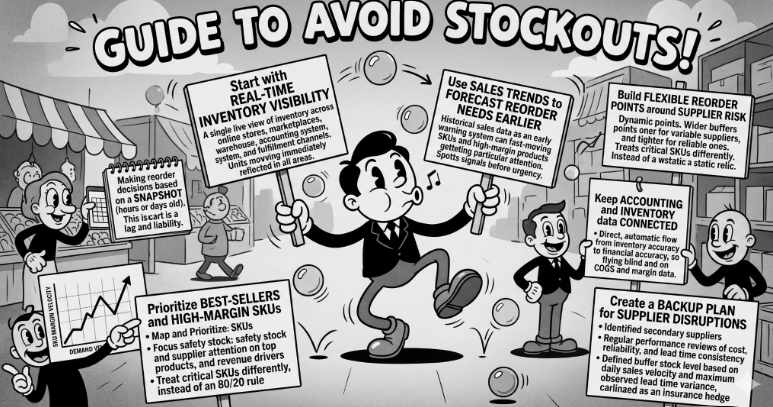
Start with real-time inventory visibility
Every strategy in this post falls apart without this. You need a single, live view of inventory across your online stores, marketplaces, warehouse, accounting system, and fulfillment channels. When a unit move, for any reason, every channel needs to reflect that immediately.
Without this, you're making reorder decisions based on a snapshot that could be hours or days old. In a normal supply environment, that lag is manageable. When supplier timelines are volatile, that lag becomes a liability.
-
Use sales trends to forecast reorder needs earlier
Historical sales data becomes your early warning system. Look at which SKUs are moving fastest across channels, how seasonal demand has shifted, and where marketplace velocity is accelerating. The goal is to spot the signal that a reorder is needed before the urgency shows up in your stock count.
Fast-moving SKUs and high-margin products deserve particular attention. If lead times on those items stretch by two or three weeks, you want to know months in advance, not days before you run out.
-
Build flexible reorder points around supplier risk
A reorder point calculated on a 21-day lead time is wrong the moment that lead time changes. Reorder points should be dynamic, not static. They need to account for supplier reliability, current lead time estimates, SKU priority, and how much runway you can afford to lose on each item.
Practically, this means treating your most critical SKUs differently. Build wider buffers for suppliers with a history of variability. Tighten up on suppliers who are consistently reliable. The one-size-fits-all reorder point is a relic of more predictable supply chains.
-
Prioritize best-sellers and high-margin SKUs
Not every SKU carries the same business risk when it goes out of stock. A stockout on your top three revenue-generating products is a different kind of problem than a stockout on a slow-moving accessory.
Map your SKUs by both margin and demand velocity. Focus your safety stock investment and your supplier attention on the products that drive the most revenue and customer demand. The 80/20 rule applies here, a relatively small number of SKUs are probably responsible for the majority of your revenue, and those are the ones that can least afford to run dry.
-
Keep accounting and inventory data connected
Stockouts and supplier delays aren't just operational problems, they ripple directly into your financials. When inventory is wrong, COGS is wrong. When COGS is wrong, margin reports are wrong. When you're making cash flow decisions on incorrect margin data, you're flying blind on the things that matter most.
The connection between inventory accuracy and financial accuracy needs to be automatic, not something you reconcile at month-end. When inventory moves, those changes should flow into your books, including landed costs, supplier delays that affect holding costs, and the cash tied up in orders that are stuck in transit.
-
Create a backup plan for supplier disruptions
Single-source suppliers are a structural risk in this environment. If one supplier's lead time doubles, you need options. That means identifying secondary suppliers for your top SKUs, even if you're not actively using them today. It means reviewing supplier performance regularly, not just cost, but reliability, lead time consistency, and communication when things go wrong.
For your most critical SKUs, maintain a defined buffer stock level. Calculate it based on your average daily sales velocity and your maximum observed lead time variance.
Why all of this falls apart without real-time inventory data across channels
When supplier delays stretch timelines, the gap between what a channel shows as "in stock" and what's actually available widens fast. That gap costs real sales.
Webgility keeps that gap from forming:
-
Real-time inventory sync across Shopify, Amazon, and all sales channels, every platform reflects the same accurate count the moment stock moves
-
Orders, inventory, and financials update together, no manual entry, no reconciliation lag
-
Prevents oversells by eliminating phantom stock across channels
-
Decision-ready data, always, no firefighting on stale numbers
And for multi-channel sellers, the stakes are even higher. Celtic Mink Jewelry, selling across Etsy, Amazon, and beyond, experienced this firsthand:
"I found inventory control was my biggest challenge. Cross posting on so many channels, it's easy to oversell. Webgility keeps my sales channels aligned perfectly." - Kathleen Gallagher, CEO, Celtic Mink Jewelry
Conclusion
The inventory playbook that worked in a predictable supply environment isn't built for this one. Assume supplier timelines will change, and build systems that absorb it rather than collapse under it.
The sellers who come out ahead combine smarter inventory buffers, better supplier data, and tools that keep every channel in sync automatically. That combination turns an unpredictable supply chain from a crisis trigger into a manageable variable.
Not sure where your inventory gaps are already costing you? Use Webgility's free Profit Leak Detector to find hidden losses in your operations before they snowball into bigger problems.
FAQs
Why do changing supplier timelines cause stockouts?
They make replenishment unpredictable, causing best-sellers to sell out before new inventory arrives.
What is the best way to avoid overselling across channels?
Sync inventory in real time across marketplaces, online stores, warehouses, and accounting systems.
How does Webgility help prevent inventory shortages?
Webgility keeps orders, inventory, and accounting data connected so sellers can make decisions using accurate, current stock data.
.png?width=56&height=56&name=image%20(1).png) Vikram Bhaskaran
Vikram Bhaskaran


.png?width=24&height=24&name=image%20(9).png) Nikita Sikri
Nikita Sikri


.png?width=24&height=24&name=image%20(1).png) Yash Bodane
Yash Bodane