
.png?width=32&height=32&name=image%20(2).png)
 June 27, 2026
 4 min read
Contents


|
Key Takeaways:
|
Your Shopify store showed plenty of stock. Three customers placed orders. Then came the backorder emails.
The kits had sold fine, but two of the four components had already run out. The storefront never knew. QuickBooks had a completely different picture. Nobody caught it until the angry emails landed.
This isn't a rare edge case. It's what happens when kit assemblies aren't syncing correctly between your ecommerce platform and your accounting system, no error message, no failed sync, just a quiet drift between what your store thinks you have and what's actually available.
By the time someone notices, you've already oversold, your COGS is off, and month-end just got a lot harder.
This post covers why it happens, what it's costing you, and how to fix it for good.
Why kit assemblies break inventory valuation
A kit looks simple on the surface, the problem lives underneath:
One product for customers, multiple products for accounting
From your customer's perspective, a kit is one thing: a bundle they add to cart and receive in a box. From your accounting system's perspective, it's an entirely different beast.
QuickBooks treats assemblies as a build transaction. When a kit sells, three things should happen: the finished good gets created, the components get decremented, and the cost of each part rolls up into the COGS for that kit.
Your ecommerce platform doesn't work that way. Shopify, BigCommerce, WooCommerce, they all see the kit as a single SKU. An order comes in, the sale gets recorded, and that's it. No components. No cost rollup. No build transaction.
That gap is where the problem lives. Your storefront thinks it did its job. Your accounting system never got what it needed. And your inventory valuation quietly starts drifting from reality.
What goes wrong in practice
Here’s what typically happens behind the scenes:
- The parent SKU (kit) gets recorded
- The components are ignored
- Inventory for those components doesn’t decrease
- COGS is missing or incomplete
The result?
Your inventory valuation becomes inflated, and your financial reports stop reflecting reality.
Signs your kit assemblies are already causing problems
You may not have connected the dots yet, but these are the warning signs:
- Inventory asset value keeps growing despite steady sales volume
- Gross margins look unrealistically high- better than they should be
- Stock levels don't match warehouse reality- QuickBooks says you have it, the shelf says you don't
- Frequent manual COGS or inventory adjustments at month-end
- Spreadsheets are part of the close process to "fix" kit-related data
- True product profitability is unclear- you can't trust per-kit margin figures
If you're nodding at more than two of these, your kit assembly sync is likely already costing you.
The real business impact (beyond accounting errors)
Inventory errors don't stop at accounting, they show up in your margins, your orders, and your close:
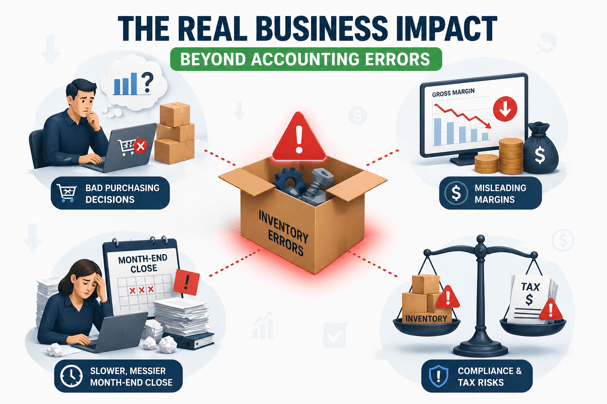
Kit assembly errors can quietly affect decisions far beyond accounting.
-
Bad purchasing decisions
Phantom inventory, stock that appears available in your books but doesn't exist in the warehouse, leads directly to stockouts or over-purchasing. If you can't trust your component counts, you can't make confident reorder decisions.
-
Misleading margins
Pricing decisions and promotional strategies built on incorrect COGS data will erode profitability over time. You won't see it immediately, but you'll feel it in cash flow.
-
Slower, messier month-end close
When you’re fixing kit issues every month-end, the workaround becomes part of the process. It’s inefficient and risky, one missed adjustment or team change can make the errors worse.
-
Compliance and tax risks
Inventory valuation in accounting directly impacts your balance sheet and tax filings. Overstated inventory inflates assets. Understated COGS inflates taxable income. These aren't just operational problems, they're financial reporting risks.
How to fix kit assembly inventory issues (step-by-step)
Follow these steps to get your kit assemblies syncing accurately from the start:
1. Define your kit structure clearly
Start by auditing every parent SKU that represents a kit or bundle. Document which components belong to each kit and in what quantities. Standardize naming conventions between your ecommerce platform and QuickBooks so there's no ambiguity in mapping.
2. Map kits to components in your accounting system
In QuickBooks, ensure each kit SKU is set up as a proper assembly item with the correct component items and quantities. This is the foundation, if the assembly isn't built correctly in QB, nothing downstream will be accurate.
3. Verify cost accuracy
Every component item needs an accurate cost. If a component's cost is wrong or missing in QuickBooks, the COGS for any kit containing it will be wrong too. Run a cost audit across all component items before you go live with any sync changes.
4. Test real transactions
Before relying on the system, test a few sample orders. Check that component inventory is reduced, the assembly is recorded in QuickBooks, and COGS is correct, don’t assume it works, verify it.
5. Monitor regularly
After go-live, spot-check inventory levels and COGS after kit-heavy sales periods. Catch mapping issues or sync gaps early, before they accumulate into a month-end problem.
How Webgility helps keep kit assemblies accurate (without manual fixes)
Fixing kit assembly issues manually is possible, but it doesn’t scale.
Webgility solves the root problem by ensuring your systems stay aligned from the start:
- Automatically maps kits to component SKUs for accurate accounting
- Ensures inventory is reduced at the component level when kits are sold
- Keeps COGS and margins aligned with actual product costs
- Flags unmapped SKUs before they create reporting errors
- Eliminates the need for manual adjustments and spreadsheet fixes
Instead of correcting inventory valuation after the fact, you maintain accuracy as transactions happen.
KVM Switches Online, a B2B electronics retailer serving data centers and IT professionals, was manually entering orders across multiple channels into Salesforce CRM and QuickBooks, a process that was error-prone and impossible to scale.
With Webgility, they cut manual order processing time by 50% and eliminated the duplicate records and data errors that came with doing it by hand.
Stop guessing whether your inventory is right
For sellers with kit assemblies, inventory valuation in accounting errors don't just create headaches, they drive bad decisions on reorders, pricing, and production planning. By the time the problem surfaces, it's usually been running for months.
The question isn't whether your current setup handles kit assemblies. The question is whether you'd know if it didn't.
If you're ready to see what accurate, automated kit assembly sync looks like in practice, book a demo with Webgility and see how it handles your specific catalog.
FAQs
What is inventory valuation in accounting?
Inventory valuation in accounting is the process of assigning a monetary value to your inventory based on cost. It directly impacts COGS, profit margins, and financial reporting.
Can QuickBooks handle kit assemblies correctly?
Yes, but only if kits are properly set up and component-level tracking is maintained. Issues arise when integrations don’t pass this detail correctly.
Can't I just map the kit SKU directly to a QuickBooks item?
You can, but it won't work correctly for long. A direct SKU map records the sale but skips the build transaction entirely, so components stay overstated, COGS gets miscalculated, and your inventory valuation quietly drifts from reality.
.png?width=56&height=56&name=image%20(2).png) Monika Tripathi
Monika Tripathi


.png?width=24&height=24&name=image%20(9).png) Nikita Sikri
Nikita Sikri


 Parag Mamnani, Webgility CEO