.png?width=96&name=image%20(9).png)
|
TL;DR
|
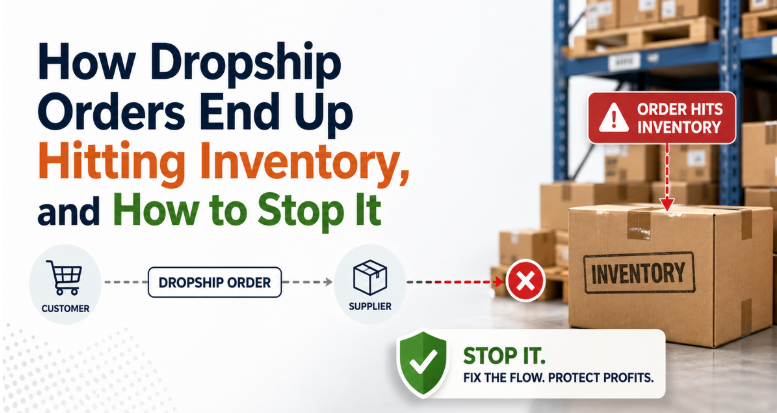
Dropshipping is supposed to eliminate inventory headaches, so why are your books showing stock movement?
Dropship order gets fulfilled by the supplier, but your system still creates phantom stock entries, incorrect COGS, inflated inventory balances, and accounting entries that were never meant to exist.
|
The myth and the reality: Most dropshippers assume they have an inventory problem. What they actually have is a sync problem and those are not the same thing. |
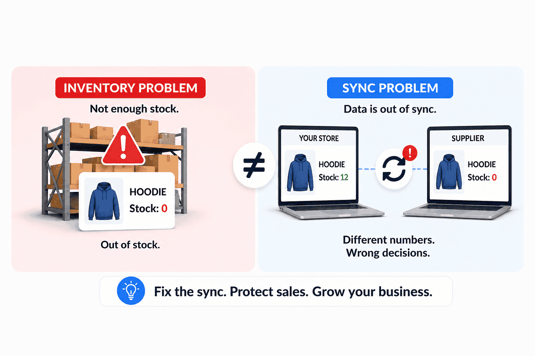
Not all inventory issues are stock shortages; sometimes the real problem is data not syncing correctly between systems.
Having said that, without a reliable dropship inventory sync, inventory data often lags behind across systems and the consequences don’t stay confined to operations, they show up directly in your books.
This guide explains why it happens, what it costs you, and how to stop it, without patching the same holes every month.
What breaks dropshipping inventory sync?
So, what is dropship inventory sync? It refers to how orders, SKUs, and fulfillment data are coordinated across ecommerce platforms, suppliers, and accounting systems without incorrectly affecting owned inventory.
Most ecommerce platforms: Shopify, WooCommerce, Amazon don't inherently distinguish between a dropship order and a stocked order. When a sale comes in, the platform records it. If your accounting system is syncing that sale, it often pulls inventory too, regardless of whether you ever touched the physical product.
Here are the three most common failure points:
1. Your sync tool doesn't know the order is a dropship
Generic connectors push every order through the same pipeline. Unless your sync is configured to recognize fulfillment source or supplier routing, the system treats every sale identically.
Result: inventory gets decreased for units you never held (known as phantom inventory)
Why this happens: Most platforms are designed to treat every order as an inventory order by default. They don’t inherently understand:
- Whether you own the product
- Who is fulfilling it
- How it should impact your books
2. Your accounting system is built for a traditional inventory model
QuickBooks Online and QuickBooks Desktop / Enterprise are generally set up to assume that when you record a sale, there’s inventory behind it. But with dropshipping, you may never physically stock that item.
So unless dropship products are mapped as non-inventory or service items, or handled through the right purchase order workflow, your inventory and COGS can be off from the beginning.
3. Supplier confirmations don’t always arrive when you need them
Dropshipping depends heavily on timing. An order comes in, it goes to the supplier, the supplier confirms it, and then the purchase gets recorded.
But when supplier confirmations are delayed, batched, or arrive out of order, it becomes hard to match what was sold with what was actually purchased. That confusion quickly turns into extra manual work and messy books.
How dropship orders end up hitting inventory
Let’s break down exactly how this happens:
1. The order is imported without fulfillment context
When an order flows from your ecommerce platform into your system, it usually comes in as a standard order.
There’s no distinction between:
- Stocked product
- Dropship product
So the system treats them the same.
2. The SKU is mapped to an inventory item
Most businesses use the same SKU across systems.
If that SKU is tied to an inventory item in your accounting system, the software assumes that
you own stock for that product, even if you don’t.
3. Inventory gets reduced automatically
Once the order is processed:
- Inventory levels are reduced
- Stock valuation changes
This happens automatically, even though the supplier handled fulfillment.
4. COGS is calculated incorrectly
Instead of using the supplier’s actual cost, the system may:
- Apply average cost
- Use outdated product cost
- Or assign a default value
This leads to inaccurate margins and misleading profitability data.
5. Supplier fulfillment isn’t properly synced back
In many setups, supplier data doesn’t flow back into the system in real time. So:
- The order is marked fulfilled
- But there’s no accurate link between supplier cost and the transaction
This creates a disconnect between operations and accounting.
|
💡Quick fact: The difference between a sync tool and an accounting-grade sync is whether it handles what actually happens in commerce, not just what's supposed to happen. |
Suggested read: How to Choose the Right Dropshipping Inventory Management Solution
How to fix it: Best practices for accurate dropship inventory sync
Fixing this doesn’t require reinventing your entire system but it does require the right structure:
1. Separate dropship vs stocked SKUs
Avoid using the same SKU for both fulfillment methods. Even a simple variation (like suffixes or tags) can help distinguish them and prevent incorrect mapping.
2. Use fulfillment-based rules
Your system should recognize whether an order is:
- Dropshipped
- Fulfilled from your own inventory
Then apply different logic accordingly.
3. Sync orders at the right level of detail
Ensure your order data includes:
- SKU
- Fulfillment method
- Supplier information
- Cost details
This is critical for accurate accounting.
4. Map SKUs correctly in accounting
Dropship items should typically be linked to:
- Non-inventory accounts
- Or accounts that don’t affect inventory assets
This prevents inventory distortion.
5. Track COGS at the order level
Instead of relying on static or average costs, use actual supplier cost per order. This gives you accurate margins and better financial visibility.
6. Automate Supplier Data Integration
The most effective setups close the loop between:
- Order creation
- Supplier fulfillment
- Cost recording
When supplier data flows back automatically, accuracy improves significantly.
Why automate dropship inventory sync across multiple channels
If you're selling on Shopify, Amazon, and wholesale simultaneously, the problem compounds. Each channel has its own fulfillment logic, its own timing, and its own definition of what a completed order looks like.
Multi-channel dropship inventory syncing requires:
- Channel-aware posting rules so Shopify DTC orders, Amazon FBA, and wholesale dropship orders don't get flattened into a single transaction type
- Per-channel COGS accuracy because your supplier cost for the same SKU may differ by channel, and your margins depend on knowing that
- Consistent inventory signals so your available stock reflects reality across all storefronts, not just the one your sync was built for
The merchants who manage this well aren't doing it manually. They have a sync layer that understands that a Shopify dropship order and an Amazon dropship order are not the same financial event, even if they involve the same SKU.
This is the gap that purpose-built ecommerce accounting platforms are designed to close. Solutions like Webgility connect Shopify, Amazon, WooCommerce, and wholesale channels to your accounting system with posting logic that goes beyond raw data transfer: handling fees, refunds, COGS, and inventory with the kind of context that generic connectors don't provide.
For multi-channel dropshippers, that distinction is the difference between books you trust and books you dread.
Quick checklist: Is your dropship sync working?
Run through these before your next close:
- Are dropship items mapped as non-inventory or service items in QuickBooks, not inventory parts?
- Is your COGS posting in the same period as the revenue from the sale?
- Do your inventory balances exclude units you never physically stocked?
- Can you explain every line in your inventory asset account without a spreadsheet?
- Are partial fulfillments and supplier delays triggering exceptions or silently corrupting your books?
- Is your sync channel-aware, or is it treating all orders identically?
If you found yourself hesitating on more than one of these, the problem isn't your accounting skills. It's the layer between your store and your books.
Stop guessing, start closing with confidence!
Dropshipping was supposed to simplify your operations. It shouldn't make your accounting harder. But when inventory sync doesn't understand the difference between a dropship order and a stocked order or doesn't handle the exceptions that come with real-world commerce, it does exactly that.
The fix isn't a spreadsheet workaround or a manual journal entry every month. It's a sync layer that understands how your business actually works.
|
Note: If your current sync is creating inventory entries for products you never touched, it's not a sync. It's a liability. |
See how Webgility handles dropship inventory sync across channels and what clean, reliable books can look like when your order, inventory, and accounting data work together.
Sync inventory and pricing across all your sales channels and accounting in one place.
Webgility is built for ecommerce businesses that need more than a basic connector. For dropshippers, that means fewer manual fixes, cleaner reconciliation, and better visibility across every channel you sell on.
With Webgility, you can:
- Sync dropship orders across multiple channels without losing SKU-level detail
- Keep inventory activity separate from products you don’t physically stock
- Connect Shopify, Amazon, WooCommerce, QuickBooks, Xero, and more in one workflow
- Track fees, refunds, COGS, and exceptions with accounting context
- Reduce month-end cleanup by keeping ecommerce and accounting data aligned from the start
For growing dropshippers managing mixed fulfillment, multiple storefronts, or high order volume, Webgility gives you a more reliable way to keep inventory accurate and your books reconciliation-ready, all under one platform.
.png?width=128&name=image%20(9).png)


