

 December 19, 2025
 5 min read
Contents


TLDR

QuickBooks Estimates are supposed to speed up your sales process. Instead, you manually create quotes, convert them to invoices, update pricing across channels, and discover your estimate was wrong after fees and shipping costs get added.
High-volume sellers waste hours building estimates that become outdated the moment marketplace fees change or inventory costs shift.
Estimates built manually cannot account for real-time channel costs, fee structures, or dynamic pricing. Most teams abandon estimates entirely or rely on outdated templates that hurt margins.
In this guide, you will learn how to build accurate QuickBooks Estimates and automate estimate-to-invoice workflows.
Why QuickBooks estimates matter for growing businesses
QuickBooks Estimates set expectations and drive revenue predictability.
An estimate is a formal proposal outlining the scope, timeline, and cost of products or services before work begins. Unlike informal quotes or post-delivery invoices, estimates bridge planning and execution. They give both parties clarity on commitments before any payment is made.
Well-managed QuickBooks Estimates impact your business in three critical ways:
- Cash flow forecasting: Predict when payments will arrive and plan resources accordingly
- Profit protection: Capture all costs upfront to prevent margin erosion
- Client trust: Set clear expectations to avoid disputes and scope creep
For a B2B seller, slow or inaccurate estimates can mean lost deals and frustrated customers. As you expand to new channels like Shopify, Amazon, and B2B portals, estimate complexity increases.
Each platform may have different pricing, terms, and tax rules. Disconnected estimates make it difficult to see true project profitability and align quotes with real-time inventory.
Disconnected estimates can create hidden risks, especially when orders flow in from multiple platforms.
But before you can optimize, you need to master the basics and avoid the common traps.
Suggested read: QuickBooks Setup Preparation Guide for Ecommerce
QuickBooks estimates: Master the basics, avoid the traps
QuickBooks makes estimate creation simple, but manual workflows can lead to costly errors.
How to create an estimate in QuickBooks
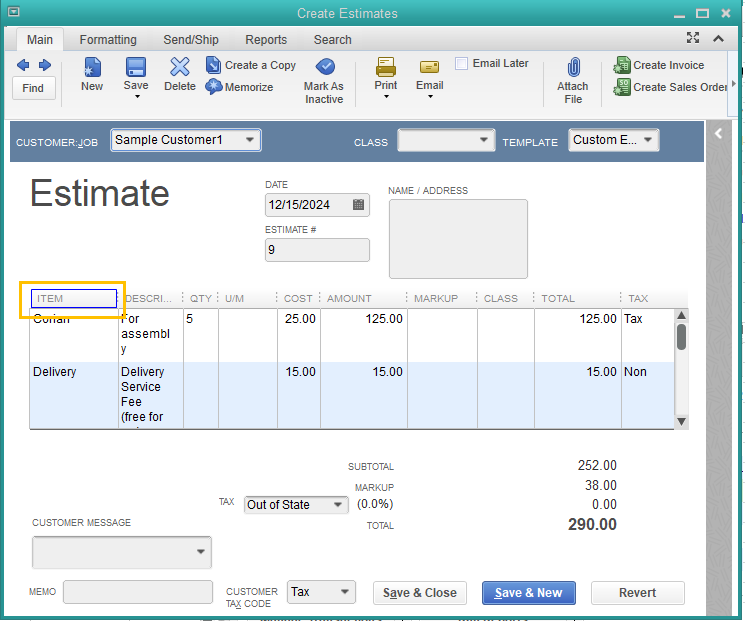
QuickBooks Estimates in action
Follow these steps to set up and create QuickBooks Estimates:
- Enable estimates in Edit > Company Preferences > Jobs & Estimates
- Select "Yes" to "Do you create estimates?"
- Go to Customers > Create Estimates
- Enter the estimate number, date, and customer details
- Add line items with quantity, rate, and applicable taxes
- Save as draft or send directly to the customer
QuickBooks allows you to customize templates, add custom fields, set expiration dates, and divide large projects into phases for progress billing. You can also attach supporting documents or notes for added clarity.
Suggested read: QuickBooks Online vs. Desktop: Which Fits Your Business?
Common pitfalls as you scale
As order volume and channels grow, manual estimate management creates four major bottlenecks:
- Version confusion: Teams reference different estimate versions across email, QuickBooks, and verbal approvals
- Lost approvals: QuickBooks Estimates get buried in email threads with no central tracking
- Slow follow-up: Deals slip through cracks because no one monitors pending estimates
- Manual status tracking: Checking each estimate individually wastes hours weekly
Manual tracking is manageable at a small scale, but QuickBooks ecommerce automation becomes essential as you grow.
But the real challenge starts when you add more sales channels and platforms.
Suggested read: Fixing QuickBooks Accrual Accounting Errors: A Practical Guide
When multi-channel selling breaks your estimate workflow
Disconnected and manual accounting systems mean lost revenue, inventory errors, and wasted time.
Suppose you create a $5,000 bulk order estimate in QuickBooks for 100 units. The customer verbally approves on Wednesday. On Thursday, another customer places an Amazon order for the same inventory.
Your team fulfills the Amazon order without checking the pending estimate, because your systems are not connected. When the bulk customer is ready to proceed, you are oversold by 30 units. The estimate needs revision, the customer is frustrated, and the sale is at risk.
Multi-channel selling creates operational chaos when systems do not communicate:
- Data silos: Each platform operates independently with no shared visibility
- Duplicate entry: Manually recreating estimates as orders in each channel
- Version confusion: Uncertainty about which estimate version is current
- Delayed fulfillment: Disconnected data slows the sales-to-operations handoff
So, how do you fix the disconnect and streamline your QuickBooks workflow?
From estimate to invoice: Streamlining the workflow
Streamlined estimate-to-invoice workflows accelerate cash flow and reduce errors.
The ideal process is seamless: estimate approval triggers invoice creation, accounting updates automatically, and fulfillment begins within minutes.
How to convert an estimate to an invoice in QuickBooks
- Open the accepted estimate in QuickBooks
- Click "Create Invoice" or "Convert to Invoice"
- Choose to invoice the full amount or use progress invoicing for partial billing
- Review and adjust line items as needed
- Save and send the invoice to the customer
Best practices include tracking status, using partial billing for staged projects, and handling revisions or change orders by updating the original estimate or creating a new one. Always reconcile the invoice with the estimate to ensure accuracy.
Manual steps can slow things down:
- Approval tracking: Someone must monitor which estimates are accepted or pending
- Status updates: Delays occur if approvals are not recorded promptly
- Invoice posting: Manual verification is needed to ensure accuracy
- Reconciliation: Each conversion must be checked against inventory and financial records
But even the best manual workflow cannot keep up with multi-channel ecommerce accounting complexity. Here is where automation transforms the game.
Cut 90% of estimate admin time with automation
Accounting automation transforms estimates from a bottleneck into a growth engine.
Real-time inventory sync prevents overselling
When you create an estimate for a specific quantity, that inventory must be available. Real-time inventory sync updates stock levels instantly across all platforms whenever an order is placed or adjusted. This prevents overselling and ensures you can fulfill every approved estimate.
Centralized dashboard eliminates visibility gaps
A centralized dashboard connects every channel and syncs financial data in real time. You can track sales performance, monitor cash flow, and analyze profitability by product and channel, all in one place.
Automated posting eliminates manual entry and errors
Automation syncs orders, fees, and taxes directly into accounting, reducing errors and freeing your team from repetitive tasks. Refunds, returns, and payouts are reconciled automatically, so your records stay accurate.
Here are some proven tactics to get started.
5 proven tactics to cut estimate processing time in half
Best-in-class QuickBooks estimate workflows are built on templates, automation, and regular review.
- Use estimate templates for consistency: Create standardized templates for different project types or customer segments. This ensures every estimate is professional and accurate.
- Segment leads and customers by channel or type: Tailor QuickBooks Estimates for wholesale, retail, or international customers. Accounting automation tools can apply the right pricing and terms automatically.
- Automate reminders and approval tracking: Set up automated reminders for expiring estimates and route approvals to the right team members. This reduces manual follow-up and speeds up deal closure.
- Schedule regular reporting and analytics review: Monitor metrics like estimate-to-invoice conversion rate and average approval time. Use these insights to identify and fix bottlenecks.
- Integrate orders and inventory for real-time accuracy: Connect your sales channels and accounting to keep inventory, estimates, and orders in sync. This prevents errors and overselling.
Webgility automates the estimate-to-invoice workflow by syncing orders, inventory, and pricing across all channels in real time.
When an estimate converts to an order, Webgility posts it to QuickBooks automatically with accurate fees, taxes, and shipping costs mapped correctly. No manual data entry, no pricing mismatches, and no reconciliation errors.
Epic Mens, an apparel retailer selling on Shopify and Amazon, scaled order volume by 42% while maintaining a lean team of four that efficiently processes 6,000 to 15,000 orders per month.
Before Webgility, they spent hours manually syncing sales records and inventory between storefronts and QuickBooks Enterprise. After automation, they saved 80+ hours per week and moved from annual to weekly inventory counts, enabling faster, more accurate QuickBooks Estimates and pricing decisions.
Book a demo with Webgility today.
Frequently asked questions (FAQs)
How can I customize QuickBooks estimates for different sales channels?
You can create and save multiple estimate templates in QuickBooks. Customize branding, fields, and terms for each channel or customer type to ensure consistency and professionalism.
How do I track estimate status across multiple platforms?
Automation tools let you view all estimates, orders, and invoices in a single dashboard. Status updates sync in real time, so you always know what is pending, approved, or invoiced.
What security options exist for managing estimates?
QuickBooks and automation platforms allow you to set user permissions by role. This controls who can create, edit, or approve estimates and protects sensitive business data.
How does automation handle estimate revisions or partial approvals?
Automation platforms track changes, route revised estimates for approval, and update records automatically. Every change is documented and visible for your team.
 David Seth


 Parag Mamnani, Webgility CEO
-3-3.webp)
 David Seth
-4.webp)