
.png?width=32&height=32&name=image%20(1).png)
 December 23, 2025
 7 min read
Contents


TLDR

You are sitting on $50,000 of dead inventory while your bestsellers stock out weekly. ABC analysis promises answers, but most Shopify brands never turn insights into action. The result: lost cash flow, missed sales, and hours wasted on spreadsheets that only highlight what is already broken.
This guide gives you a proven playbook for turning Shopify ABC product analysis into automated, profitable decisions, so your inventory finally works for you.
How Shopify ABC product analysis unlocks 30% more profit from existing inventory
ABC analysis is the foundational lever for maximizing profit, ecommerce cash flow, and operational agility when executed consistently.
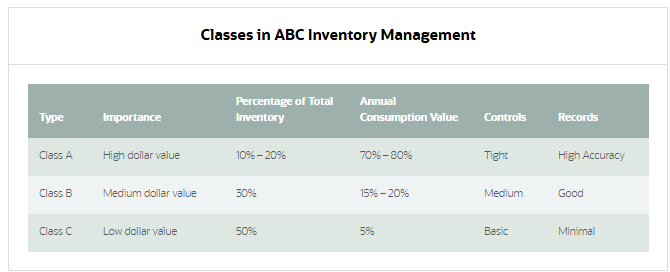
It segments your products into three groups based on their contribution to total revenue. The method follows the Pareto Principle, showing that about 20% of your inventory typically accounts for 80% of your revenue.
By classifying products into Class A (top 20% contributing roughly 80% of revenue), Class B (next 30% contributing about 15%), and Class C (remaining 50% contributing approximately 5%), you gain clarity about where to invest your inventory management effort.
However, most Shopify brands attempt ABC analysis using static spreadsheets that quickly become outdated.
A product classified as Class B last month may have shifted to Class A based on this week's sales, but manual spreadsheets do not capture that shift in real time.
Without current data, your decisions remain anchored to outdated assumptions, causing stockouts, overstocking, and missed opportunities.
Webgility’s real-time inventory sync ensures that ABC classifications reflect today’s sales velocity, not last month’s trends, enabling faster and smarter decisions at scale.
Suggested read: Inventory Management in Ecommerce: How It Saves Money
5 ABC mistakes costing Shopify brands thousands monthly
Shopify ABC product analysis fails most often not because the concept is flawed, but because execution misses critical nuances or the underlying data is outdated.
1. Revenue-only classification ignores margin and true profitability
Ranking products by sales volume alone, without factoring in margin or cost of goods sold, is the most common ABC error.
A product generating $100,000 in annual revenue may sound like Class A, but if it carries a 5% margin while a slower-moving product carries a 35% margin, your priorities are reversed.
The fix: Use contribution margin instead of revenue to classify products. Contribution margin is revenue minus variable costs. When you rank by contribution margin, you identify which products actually drive profit.
2. Static categories fail as trends shift
ABC classifications created three months ago are now outdated. Demand patterns, seasonality, new product launches, and competitive pressures cause products to shift classes frequently.
Clinging to old classifications means you continue to overstock slow movers and under-reorder fast movers.
The fix: Review and update ABC classifications at least quarterly. Fast-growing brands often benefit from monthly reviews. Flag significant shifts immediately and adjust reorder points accordingly.
Dynamic reclassification, where classifications update automatically based on nightly sales data, eliminates this risk entirely.
Suggested read: Best Shopify Square Integration Solutions
3. Spreadsheet decay causes cascading errors
Manual Shopify ABC product analysis stored in spreadsheets degrades quickly. Data entry errors, formula corruption, version conflicts, and outdated information compound into widespread inaccuracy.
Studies show that retailers relying on spreadsheets often achieve only 65-70% inventory accuracy due to manual errors and version-control issues. One misplaced decimal point can trigger phantom orders or stockouts.
The fix: Replace spreadsheets with automation. Real-time inventory software that syncs sales data automatically eliminates manual entry errors and version conflicts.
4. Channel blindness misses critical differences
A product may be Class A on Amazon but Class C on your Shopify store. Treating all channels the same ignores these differences.
When you fail to track ABC classifications by channel, you under-stock bestsellers in your highest-margin channels and over-stock slower items in lower-margin channels.
The fix: Segment ABC classifications by channel.
Allocate more inventory to your highest-margin channels and adjust pricing or promotion accordingly. Webgility’s multi-channel inventory makes it easy to see SKU-level and channel-level profitability side by side.
5. Ignoring seasonality and new products creates inventory crises
ABC classifications built on mannual data obscure seasonal spikes and miss emerging trends. A winter coat looks Class C year-round if you average annual sales, but during Q4 it is your Class A bestseller.
New products launched mid-year have zero historical sales data, so ABC analysis relegates them to Class C despite strong early momentum.
The fix: Incorporate seasonal factors and product lifecycle stage into your ABC reviews. Flag seasonal products and adjust classifications quarterly or by season.
For new products, monitor early velocity closely and fast-track them to Class A status if demand justifies it. Pre-holiday, increase Class A inventory targets by 30–50% based on prior-year patterns.
Once you know the risks, you can build a decision framework that prevents them.
The 3-trigger system for automated inventory decisions
Shopify ABC product analysis only drives value when it triggers action. Without clear decision rules, insights remain insights, never becoming profit improvement.
The most successful Shopify brands operate using a simple rule-based framework: when a product hits a specific threshold (stock level, sales velocity, age in inventory), a predetermined action is triggered automatically. These triggers eliminate guesswork and create consistency across your team.
Class A triggers (top 20% of SKUs)
- Reorder point: When stock coverage drops below 15 days, auto-generate a purchase order
- Review frequency: Daily velocity check, weekly deep dive
- Stockout prevention: Safety stock equals 1.5 times average weekly sales
- Promotion strategy: Never discount below a 15% margin
Class B triggers (middle 30% of SKUs)
- Reorder point: 30-day stock coverage threshold
- Review frequency: Weekly velocity monitoring
- Velocity alert: If sales drop 30% week-over-week, flag for review
- Optimization: Test small promotions to move to Class A
Class C triggers (bottom 50% of SKUs)
- Reorder point: Only reorder if stock depletes to zero
- Review frequency: Monthly aging analysis
- Clearance trigger: If unsold for more than 120 days, schedule a 25% discount
- Bundle strategy: Pair with Class A items after 180 days
With ecommerce automation rules, you set these triggers once. Webgility monitors inventory in real time and alerts your team only when action is needed. No more manual checking or missed reorder points.
But how does this work in specific scenarios? Let us walk through the workflows.
Step-by-step: Applying Shopify ABC product analysis
Shopify ABC product analysis is only powerful when it drives real-world actions. Here is how successful brands apply it to common inventory challenges.
Scenario 1: Sudden bestseller (Class B to A)
Trigger: Product velocity increases 50% for two consecutive weeks
Workflow:
- System auto-reclassifies from B to A
- Reorder point adjusts from 30 to 15 days coverage
- Marketing team receives alert to boost ad spend
- Homepage feature slot opens automatically
Decision point: If supplier lead time is greater than 14 days, place emergency order immediately.
Scenario 2: Clearing slow-movers (Class C)
Trigger: SKU aged more than 120 days with fewer than 5 units sold monthly
Workflow:
- System flags for clearance pricing
- Create bundle with complementary Class A item
- If no movement after 30 days at 25% off, increase to 40%
- After 180 days, liquidate or donate for tax write-off
Decision point: If storage cost exceeds 10% of product value monthly, prioritize immediate clearance.
Scenario 3: Seasonal reclassification
Trigger: 60 days before historical peak season
Workflow:
- Review last year’s seasonal performers
- Pre-emptively move seasonal items up one class
- Increase reorder quantities by 1.5 times from the previous year
- Set velocity monitoring to daily
Decision point: If early-season sales exceed projections by 25%, double down on inventory investment. The key is real-time Shopify inventory alerts when products change classes.
Webgility surfaces these changes automatically, so you can restock or promote before trends pass you by.
Quick implementation checklist:
- Map current SKUs to ABC categories
- Set reorder triggers in your system
- Create promotion rules for each class
- Schedule weekly review meetings
- Assign clear ownership for each trigger
These workflows work until manual processes slow you down. Here is why automation is essential.
Suggested read: Shopify Payouts Explained: Timelines, Fees & Reconciliation
When spreadsheets fail: Automating ABC at 1,000+ SKUs
Manual Shopify ABC product analysis cannot keep pace with 500+ SKUs and multiple channels. At scale, spreadsheet-based workflows create more problems than they solve.
|
Factor |
Manual process |
Automated process |
|
Update speed |
2-4 weeks behind |
Real time |
|
Accuracy |
85% (15% error rate) |
99.5%+ |
|
Labor hours |
80+ hours/week |
2-4 hours oversight |
|
Channel coverage |
Usually Shopify only |
All channels unified |
|
Alert timing |
After problems occur |
Before stockouts |
Table 1: Manual vs. automated Shopify ABC product analysis
Real-time automation transforms Shopify ABC product analysis into an operational advantage:
- Real-time classification updates: Products move between classes automatically as sales patterns shift
- Instant threshold alerts: When Class A inventory drops below 15 days, your team knows immediately
- Rule-based execution: Set it once, run it forever. Auto-reorder Class A items, flag Class C for clearance, and adjust safety stock dynamically
- Channel-level intelligence: See ABC classification by channel (Shopify, Amazon, POS systems), not just blended averages
How Webgility helps Shopify brands automate ABC-driven inventory decisions
Webgility delivers the real-time ecommerce accounting foundation that makes ABC automation possible. Unlike tools that only sync payouts or require manual updates, Webgility provides order-level, real-time data across all your channels.
Key automation features:
- Real-time inventory sync across Shopify, Amazon, and POS
- SKU-level profitability tracking
- Automated classification rules based on your thresholds
- Instant alerts when products change classes
- Multi-channel ABC views in one dashboard
Handle 10 times more orders with the same team, no new hires needed. Track true margins down to the SKU, not just revenue.
Once automation is in place, you can optimize ABC for even greater profit.
Optimizing your ABC playbook as your Shopify brand grows
As your business grows, Shopify ABC product analysis must evolve. Layer in margin, channel, and seasonality to keep your playbook sharp.
- Margin-weighted ABC: Prioritize by profit. Use contribution margin to rank products and focus on high-profit items
- Channel-specific ABC: Segment by Shopify, Amazon, and POS. Allocate inventory and marketing spend where it delivers the highest return
- Seasonal reclassification: Set quarterly reviews and fast-track new products. Adjust ABC classes before peak seasons and monitor new launches closely
- Team alignment: Assign clear ownership for ABC reviews, automate reporting, and schedule regular check-ins to keep everyone on the same page
Webgility’s SKU-level and channel-level reporting makes it easy to spot margin stars and seasonal trends, so your ABC playbook evolves as you grow.
Beyond basic reporting, Webgility calculates true profitability by factoring in marketplace fees, shipping costs, and payment processing charges that other tools miss.
The platform surfaces which products drive profit on each channel, not just revenue, enabling smarter ABC classifications based on contribution margin rather than sales volume alone.
PartyMachines, a party supplies seller, gained access to dashboards showing channel and SKU-specific performance after implementing Webgility. The visibility allowed them to compare customer buying behavior across sales channels and identify which products deserved priority inventory investment.
Book a demo today.
Frequently asked questions (FAQs)
How often should I update my ABC categories?
It is best to review ABC categories at least quarterly. Fast-moving Shopify brands benefit from monthly updates, especially before and after peak seasons.
Can I automate ABC-driven decisions in Shopify?
Yes, with inventory management tools like Webgility, you can automate reordering, discounting, and discontinuation based on ABC class, all triggered by real-time data.
What if my products change classes frequently?
Automated tools can track sales velocity and reclassify products in real time, ensuring your ABC categories always reflect current demand.
How does ABC analysis help prevent stockouts?
By focusing on high-impact products and setting automated reorder points for Class A items, ABC analysis reduces the risk of running out of your bestsellers.
.png?width=56&height=56&name=image%20(1).png) Yash Bodane
Yash Bodane


.png?width=24&height=24&name=image%20(1).png) Yash Bodane
Yash Bodane
-3-Mar-26-2026-10-37-37-6673-AM.webp)
-Mar-26-2026-09-27-39-0601-AM.webp)