.png?width=96&name=image%20(1).png)

Shopify shows two inventory numbers that look similar but mean completely different things. On hand counts everything in your warehouse. Available counts what customers can actually buy.
Confusing Shopify on-hand vs. available inventory leads to overselling, disappointed customers, and hours spent fixing order cancellations. Pending orders, reserved stock, and committed inventory create gaps between these numbers that widen as order volume grows.
Most merchants discover the difference after a stockout or overselling damages customer trust.
In this guide, you will learn exactly how Shopify on-hand vs. available inventory works, five common mistakes that cause discrepancies, and how to spot problems before they cost you sales.
The real cost of inventory mistakes in Shopify
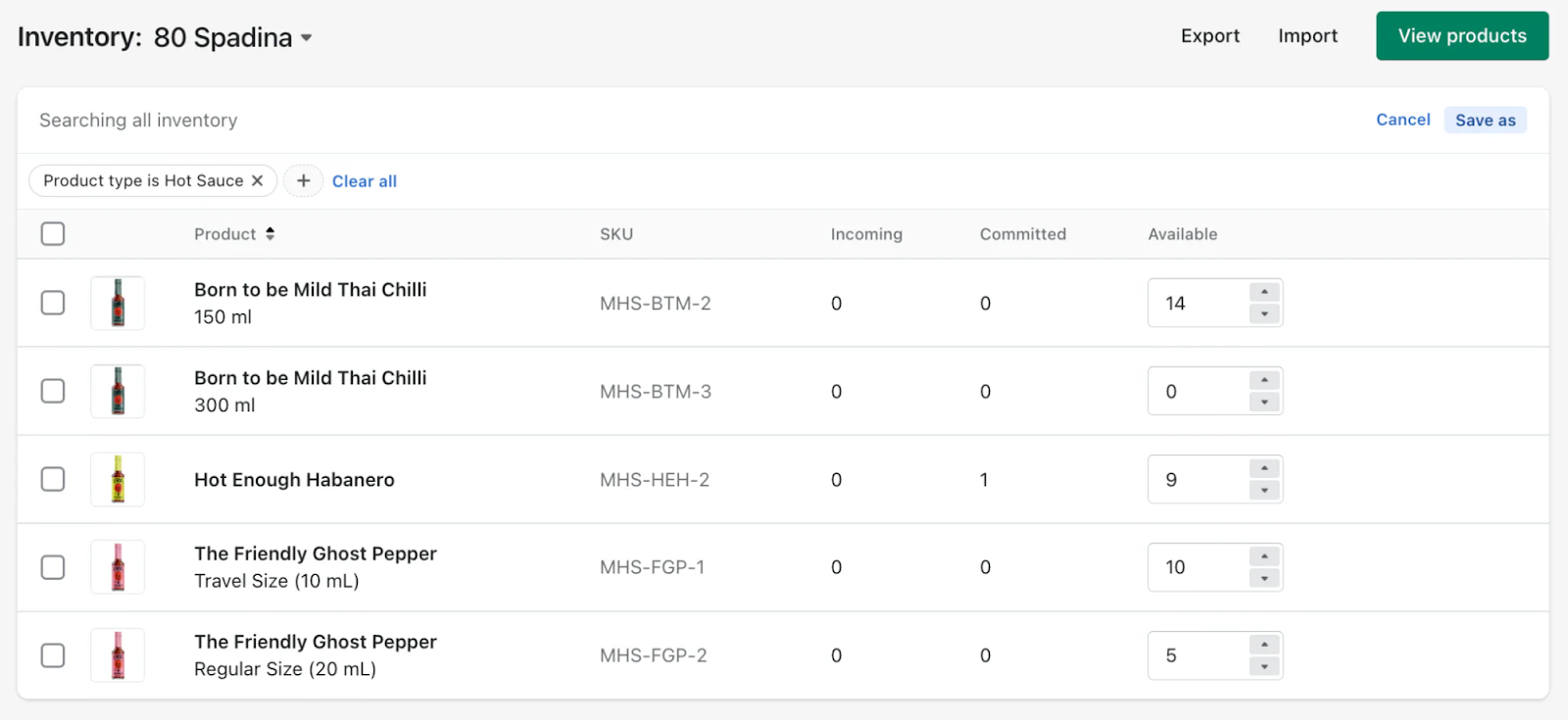
Shopify inventory dashboard
Inventory mismatches cost real money, time, and customer trust. Even a single error can trigger a chain reaction across your business.
Business impacts:
- Lost revenue and customer trust
- Overselling leads to refunds and negative reviews
- Stockouts mean missed sales opportunities
- Customer lifetime value drops after fulfillment failures
- Operational chaos
- Teams waste hours weekly on manual reconciliation
- Month-end close stretches from hours to days
- Staff firefights inventory issues instead of growing the business
- Cash flow problems
- Dead stock ties up working capital
- Rush orders to cover shortfalls cost more
- Accounting errors delay financial decisions
The compounding effect is what kills profitability. As you add sales channels, warehouse locations, or integrate accounting systems, each new connection point multiplies the risk of mismatches.
Without real-time synchronization, each system operates on its own timeline. By the time all systems align, customers have already placed orders against phantom inventory that no longer exists.
Shopify on-hand vs. available: Complete breakdown
Shopify’s inventory numbers look simple, but they hide critical complexity. Most errors start with misunderstanding the difference between “on hand” and “available.”
|
Inventory state |
What it means |
Where it shows in Shopify |
|
On hand |
Total physical units in your warehouse |
Products > Inventory > Quantity |
|
Committed |
Units reserved by orders or drafts |
Hidden in order details |
|
Available |
On hand minus committed |
Products > Inventory > Available |
|
Incoming |
Units ordered but not received |
Purchase orders or transfer section |
Table 1: Shopify on-hand vs. available inventory
5 inventory mistakes that inflate your on-hand count (and how to spot them)
These five mistakes quietly bloat your on-hand inventory. Spotting them early is the key to accuracy and profit.
Mistake #1: Ignoring pending orders and reserved stock
On-hand counts include units already committed to unfulfilled orders. If you reorder based on on-hand instead of available, you order too late. Those 50 units showing in stock might already belong to customers waiting for shipment.
How to spot it: Compare Shopify on-hand vs. available inventory weekly. A growing gap means pending orders are tying up more stock than you realize. Check unfulfilled order reports against inventory levels to see the true picture.
Mistake #2: Failing to write off damaged or unsellable inventory
Broken items, expired products, and customer returns in poor condition sit in your warehouse counted as inventory. Your system shows 100 units. Only 85 are actually sellable. You overestimate availability and underorder replacements.
How to spot it: Schedule monthly physical audits of actual sellable stock. Compare warehouse counts against system numbers. Create a process to remove damaged goods from inventory counts immediately.
Mistake #3: Not syncing inventory across sales channels
You sell on Shopify, Amazon, and a retail location. Each channel shows its own on-hand count, but none reflects sales from the others in real time.
Your Shopify store shows 30 units while Amazon sold 10 an hour ago. Total on-hand is inflated by units that no longer exist.
How to spot it: Add up on-hand inventory across all channels and compare against a physical count. If the numbers do not match, your channels are out of sync and overstating what you actually have.
Mistake #4: Counting inventory in transit as on-hand
Purchase orders ship from suppliers, and some systems count those units as on-hand before they arrive. You cannot sell inventory sitting on a truck. Counting it as available leads to overselling and customer disappointment.
How to spot it: Review how your system handles inbound shipments. Check if units appear in on-hand counts before receiving confirmation. Separate in-transit inventory from warehouse stock in your reports.
Mistake #5: Ignoring shrinkage and theft
Inventory disappears. Employee theft, shipping errors, miscounts, and unrecorded samples create gaps between system counts and physical reality. Small discrepancies compound over months until your on-hand count drifts far from the truth.
How to spot it: Conduct inventory cycle counts on high-value SKUs weekly and full physical inventory quarterly. Track shrinkage as a percentage of inventory value. Investigate when shrinkage exceeds 1-2% consistently.
Webgility’s real-time inventory sync eliminates delays by updating stock instantly across Shopify, Amazon, and your accounting system, so every number matches, everywhere.
Your daily inventory health checklist
Manual checks work for small stores, but as you scale, inventory management automation becomes essential. Use this checklist to prevent most inventory errors.
Daily:
- Review open and draft orders (Shopify: Orders > All, Orders > Drafts)
- Check POS system holds (Shopify POS app > Inventory > Holds)
Weekly:
- Reconcile incoming and transfer stock (Products > Inventory > Incoming)
- Review safety stock and manual buffers (Products > Inventory > Inventory history)
Manual checks become a bottleneck as order volume grows. Look for tools that automate these steps and flag discrepancies automatically.
Suggested read: Shopify Plus vs Multiple Accounts: True Cost & Scale Guide
When manual inventory management breaks down
Manual routines cannot keep up with multi-channel, high-volume, or multi-location operations. Automation is the only scalable solution.
Signs you have outgrown manual checks:
- Order volume exceeds 20 per day
- Selling on two or more channels or locations
- Frequent mismatches between Shopify and ecommerce accounting
- Month-end close takes days instead of hours
What to look for in a solution:
- Real-time sync (updates within seconds or minutes)
- Shopify accounting integration (QuickBooks, Xero)
- Multi-location and channel support
- Automated reconciliation and Shopify inventory alerts
Webgility delivers on every requirement. Automated reconciliation eliminates the manual matching that consumes hours weekly, while exception alerts flag inventory discrepancies before they cause oversells.
Multi-location support keeps stock accurate across warehouses and retail stores without spreadsheet tracking.
Nappy Shoppe, a baby apparel retailer selling across multiple channels, fell eight months behind on QuickBooks entries while manually managing inventory and orders. They had no real picture of their financial position or accurate stock levels.
After implementing Webgility, they saved 52 hours per week on shipping and order entry, reduced shipping labor by 88%, and finally gained the inventory visibility needed to make informed business decisions.
Book a demo with Webgility today.
Frequently asked questions (FAQs)
What is the difference between Shopify on-hand vs. available inventory?
On hand is your total physical stock. Available is on hand minus all committed inventory (orders, drafts, holds). Only available inventory can be sold.
How often should I check for inventory mismatches?
If you sell on one channel, check daily. For multi-channel or high-volume stores, automated tools that flag mismatches in real time are best.
Can manual adjustments fix accounting and inventory mismatches?
Manual adjustments can fix one-off errors, but they do not solve underlying sync issues. Use tools that reconcile inventory and accounting automatically.
.png?width=128&name=image%20(1).png)