.png?width=96&name=image%20(1).png)

Ecommerce businesses operate everywhere all at once, creating some unique challenges for products and customers, especially when it comes to accounting and keeping the books. The business may be simpler to run from a sales perspective, but you’re under greater scrutiny and face more regulations and tax burdens than many traditional brick-and-mortar operations.
Understanding accounting needs, tax requirements, and potential threats to revenue is essential, whether you’re starting out or just realized you needed to be filing paperwork in more states. If you’re selling something online or managing the books for companies that do, it’s time to brush up on Ecommerce Accounting 101.
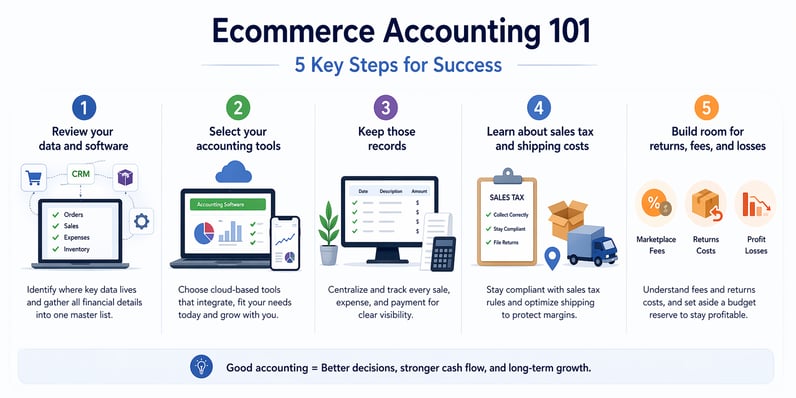
Here are five places to start:
1. Review your data and software
Start by reviewing the tools you already use to run your ecommerce business, such as your website, ecommerce platform, CRM, and inventory or order management systems. Identify where your key accounting data lives, including orders, sales, expenses, and inventory updates, and note how that information is already being shared between systems.
Then gather your financial details into one clear master list, including bank accounts, credit cards, overhead costs, payroll, and any auto-pay expenses like software or utilities. If you manage books for someone else, make sure you understand what tools they use and where their sales and spending data comes from, so there are no surprises later.
2. Select your accounting tools
Now, your ecommerce accounting goal is to find the right tool that connects as much of this as possible. Cloud-based platforms can often integrate with your ecommerce and financial services. Create a shortlist of accounting options based on your most limiting software, likely either the CRM or ecommerce platform, and start reading reviews.
Think about the features that you need right now and the ones you’ll want in the future. Accounting tools that support recurring payments will make it easier to offer subscription-based products or services down the road, for example.
If you run your business from your smartphone as much as your laptop or desktop, then check out the apps these programs offer, too. Your goal is to be able to see your business’ health at a glance easily and also quickly dive into invoices, profit and loss reports, expense reports, and more.
3. Keep those records
Once your accounting platform is set up, bring all your financial activity into one place and make sure every sale, expense, and payment is being recorded correctly. Track income, tag expenses, and keep a clear view of marketing spend, receipts, and revenue across each sales channel.
Because most ecommerce transactions are digital, it’s easier to connect accounts and automate much of the process, but you still need to review what’s coming in and going out. Keep records of cash purchases, monitor vendor payments, and track costs tied to each sale so you can budget better and avoid cash flow surprises.
4. Learn about sales tax and shipping costs
Sales tax can get complicated fast in ecommerce. You need to make sure you’re charging the right amount, staying up to date on changing rules, and filing correctly in every state where your business has tax obligations. Even if a marketplace or platform collects tax for you, you may still need to file returns anywhere you hold an active sales tax permit.
Shipping costs add another layer of variability because they change based on order size, packaging, carrier, and where your customers are located. You can reduce shipping costs by optimizing packaging, choosing the right carriers, and positioning inventory in warehouses closer to your most common shipping zones.
Since both shipping and sales tax can shift from order to order, it’s smart to leave extra room in your budget to avoid margin surprises.
5. Build room for returns, fees, and losses
Marketplace fees and returns are two of the biggest profit killers in ecommerce. Always review your partner and marketplace agreements to understand commissions, minimum fees, and any variable costs. If you use a third-party fulfillment service, factor in storage, labor, and shipping charges, because paying too much here can wipe out your margins entirely if products move slowly or pricing isn't dialed in.
Returns add another layer of cost. A returned item may be too damaged to resell, and you'll still incur labor costs for processing claims and determining whether damage happened in transit, by the customer, or due to a defect. Track your return rate and set aside a budget reserve to cover these expenses before they catch you off guard.
Is a Bookkeeper worth it?
Ecommerce accounting is complicated and many sellers, even small ones, look to ecommerce-focused bookkeepers for assistance. Accountants can help make the process run more smoothly and keep you in compliance with the full range of laws that impact your operations.
But, as your business grows across channels, products, and teams, bookkeeping becomes even harder to manage alone. That's where the right accounting software such as Webgility becomes just as important as the right person. Choosing tools your bookkeeper already knows, or can quickly learn, means less time onboarding and more time keeping your finances on track.
The right combination of software and expertise takes a huge weight off your shoulders, and the better your bookkeeper collaborates with leadership, the better positioned your business is for long-term growth.
Bottom Line
Ecommerce accounting doesn't have to be overwhelming. With the right tools and processes, you can stay compliant, protect your margins, and scale with confidence. Navy Hair Care's COO put it best, Webgility gave them back their time by eliminating manual entry and errors entirely.
Stop guessing at your numbers and go beyond sync with Webgility. From automated bookkeeping to real-time financial reporting across every channel, it's everything your ecommerce business needs to grow smarter.
FAQs
What software do I need for ecommerce accounting?
You need accounting software that integrates with your ecommerce platform, payment processors, and bank accounts. Popular options include QuickBooks, Xero, and FreshBooks. Choose tools that can pull sales data automatically, track expenses by channel, and generate profit and loss reports. Cloud-based platforms work best since they sync across devices and integrate with most ecommerce tools.
Do I need to file sales tax in every state I sell to?
Yes, if you have an active sales tax permit in a state, you must file returns there, even if your ecommerce platform collects taxes on your behalf. Currently, 45 U.S. states plus Washington D.C. have sales tax requirements. Check each state's economic nexus thresholds to determine where you need to register and file.
How do I track expenses across multiple sales channels?
Use accounting software that supports multi-channel tracking and tag each transaction by sales channel (Amazon, Shopify, eBay, etc.). Record total revenue and revenue per channel separately. Automation tools like Webgility can sync sales, fees, and expenses from multiple platforms into one accounting system automatically.
When should I hire a bookkeeper for my ecommerce business?
Consider hiring a bookkeeper when you're struggling to keep up with sales tax filings, making frequent bookkeeping errors, expanding to new sales channels, or hiring employees/contractors. An ecommerce-focused bookkeeper understands marketplace fees, multi-state tax compliance, and platform-specific reporting, saving you time and avoiding costly mistakes.
.png?width=128&name=image%20(1).png)