.png?width=96&name=image%20(9).png)
|
TL;DR
|
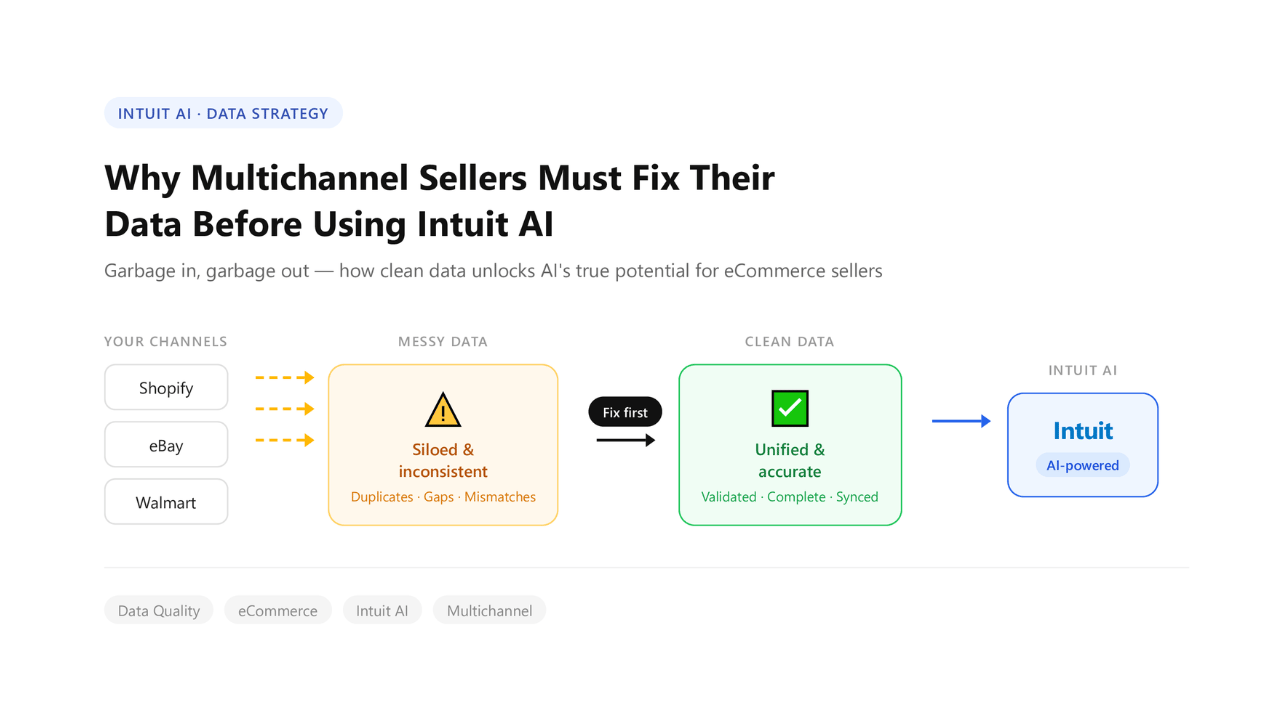
Intuit just embedded AI directly into QuickBooks. For ecommerce operators selling across Amazon, Shopify, and Walmart, that's either a powerful advantage or a machine that confidently produces the wrong answers. The difference comes down entirely to your data.
What is Intuit AI and what does it actually do for QuickBooks?
Intuit AI is a native AI layer built directly into QuickBooks. It auto-categorizes transactions, surfaces business insights based on historical trends, forecasts cash flow, and with the right integrations; answers natural-language questions about your finances.
It is powered by Intuit's landmark $100M+ partnership with OpenAI, which embeds generative AI directly into the QuickBooks platform.
What it does well: Pattern recognition across structured, consistent financial data.
What it cannot do: Fix incomplete records, reconcile mismatched payouts, understand ecommerce-specific complexity, or infer data that was never posted.
The critical constraint: Intuit AI reasons with whatever data is already in your QuickBooks. If that data is summarized at the payout level rather than the order level, the AI has no transactions to analyze, only totals. If marketplace fees were never mapped to the right accounts, the AI calculates margins using the wrong inputs. There is no AI capability that compensates for a broken data foundation.
What this guide covers: Why multichannel seller data breaks Intuit AI, what the five most common data gaps are, and what you need in your books before you trust a single AI recommendation.
Let’s get started!
What Intuit AI actually does (And what it needs)
To be fair, Intuit AI does some things well.
- Auto-categorizes transactions
- Forecasts cash flow
- Surfaces insights based on historical trends
What it does not do:
- Fix incomplete or messy data
- Reconcile mismatched payouts
- Understand ecommerce-specific complexity (fees, settlements, multi-channel SKUs)
Here’s the reality: Most multichannel sellers aren’t feeding AI the right inputs.
In QuickBooks, many ecommerce businesses only have deposit summaries, lump-sum payouts from platforms, instead of actual order-level data.
That’s like asking a chef to cook a gourmet meal… but only giving them the final grocery bill, not the ingredients.
AI can only analyze what it sees. And right now, for many sellers, it’s seeing very little.
Why multichannel data is uniquely messy
Every channel reconciles differently, and none of them make it easy:
- Amazon pays out every 2 weeks, net of FBA fees, refunds, storage costs, and ad credits
- Shopify records gross revenue, but fees, shipping, and returns are scattered across systems
- Walmart/eBay each have their own reconciliation logic
When this data hits QuickBooks, things start to break:
- Duplicate entries
- Missing or delayed COGS
- Fees buried in “Other Expenses”
- Refunds posted in the wrong period
The result? A patched-together system.
Many sellers rely on:
- Manual order entry
- Separate QuickBooks files
- Offshore accountants manually patching the gaps
It works, but it’s not AI-ready, "close enough" is no longer acceptable.
What "Dirty Data" does to AI outputs
You’ve heard “garbage in, garbage out.”
With AI, it’s worse.
Because now the output sounds confident.
Here’s how bad data misleads Intuit AI:
- AI says your best channel is Shopify.
Reality: Amazon fees were never posted, so Amazon margins look artificially high. The comparison is meaningless.
- AI recommends scaling SKU X.
Reality: COGS for that SKU are wrong because FBA storage fees weren't mapped. You'd be scaling a losing product.
- AI forecasts healthy cash flow.
Reality: Payout timing mismatches mean your receivables are phantom, the money isn't arriving when the AI thinks it is.
The danger isn't that AI gives you no answer. It's that it gives you a confident wrong answer, with charts to match.
The 5-point QuickBooks data audit for multichannel sellers
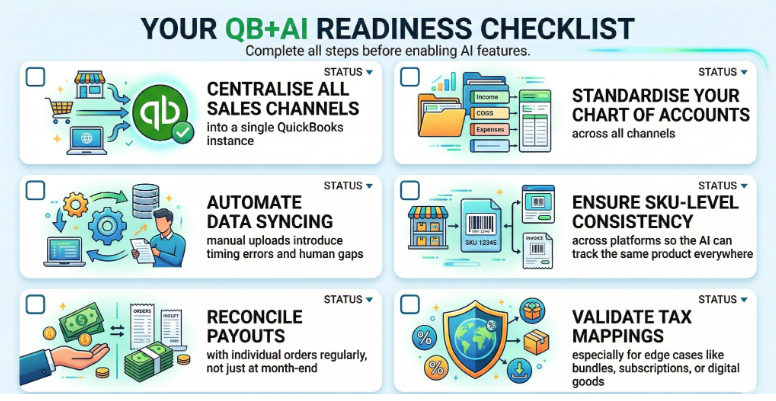
Before you trust any output from Intuit AI, run through these five checks:
1. Are orders posting individually or as lump deposits?
AI needs order-level data to understand:
- Channel performance
- SKU trends
- Customer behavior
If everything is summarized, AI has nothing to analyze.
2. Are marketplace fees mapped correctly?
FBA fees, referral fees, fulfillment costs, these must be:
- Categorized properly
- Assigned to the right accounts
If they’re buried, your margins are wrong.
3. Are refunds and returns timed correctly?
Refunds should be recorded when they happen, not when payouts settle.
Otherwise:
- Monthly P&Ls get distorted
- AI misreads trends
4. Is COGS posting at the order level?
Without SKU-level cost tracking:
- Margin analysis is meaningless
- AI recommendations become guesswork
5. Are sales channels separated in QuickBooks?
Use classes or locations to tag channels.
Without this:
- AI can’t compare Amazon vs Shopify vs Walmart
- Channel-level insights don’t exist
What happens when the data is right
With clean, order-level, fee-attributed data in QuickBooks, Intuit AI stops giving you summaries and starts giving you answers you can actually act on:
- "Which channel has the best net margin after fees?"
AI surfaces that your Shopify DTC margin is 6 points higher than Amazon once FBA fees are properly attributed, not because Amazon is bad, but because the math was never visible before.
- "Which SKU is dragging down my Q3 profitability?"
AI pinpoints that one mid-range product with high return rates is eroding margin across every channel it touches, something a P&L summary would never reveal.
- "Where should I put my next $10K in inventory?"
AI recommends restocking on your top two SKUs by net margin, not gross revenue, a distinction that only exists when COGS is posting at the order level.
- "Why didn't my payout match my sales this week?"
AI traces the gap to FBA storage fee timing and a refund batch that settled a cycle late, no spreadsheet required.
- "Is my business actually more profitable than last quarter?"
AI says yes, but only on two channels. The third is quietly losing money on every order after fees. Now you know.
This is the version of Intuit AI that was in the press release. The one that makes operators stop guessing and start running their business with real numbers.
But none of it happens without the right data underneath it.
How Webgility makes this possible
Most multichannel sellers are one bad AI recommendation away from a pricing mistake, a misallocated ad budget, or an inventory decision built on margins that were never real. That gap exists because the data layer underneath QuickBooks was never built for AI, it was built to reconcile, not to reason.
That's exactly what Webgility fixes.
Webgility connects Shopify, Amazon, Walmart, WooCommerce, and more to QuickBooks, but not as a basic sync pipe.
- Every order posts individually
- Marketplace fees are attributed line by line
- Refund timing is handled, not skipped
- COGS flows at the SKU level
Webgility doesn't just prepare your books for the month-end. It prepares them for the questions your AI is going to ask, before it confidently tells you the wrong thing.
Groomers Pro, a multichannel seller operating across Shopify and Amazon, put it plainly: "Webgility helped us save costs and eliminate errors by providing a single point of visibility into all the fees and shipping costs broken down by each channel." That's exactly the kind of fee-level clarity that transforms what QB+AI can tell you, and what it can't.
Conclusion
Intuit QuickBooks AI is a real opportunity.
It can genuinely change how ecommerce operators make decisions.
But AI is only as smart as the data it runs on.
Multichannel complexity breaks the data layer that AI depends on, and no amount of AI capability can fix what it can't see.
For sellers still using summary-level connectors or manual entry, the moment to fix the foundation is now, before the AI makes a decision you can't explain.
Your AI is only as smart as your books. Make sure yours are ready.
See how Webgility structures your ecommerce data for QuickBooks AI. Book a demo!
FAQs
What is Intuit QuickBooks AI?
Intuit QuickBooks AI is QuickBooks’ built-in AI capability designed to surface insights, automate tasks, and help businesses make faster financial decisions.
Can Intuit QuickBooks AI fix broken ecommerce accounting data?
No, it can identify patterns and generate insights, but it cannot correct poor data structure or missing details on its own.
What happens if marketplace fees are not mapped correctly?
Your margins become inaccurate, which can cause AI to recommend the wrong products, channels, or growth decisions.
.png?width=128&name=image%20(9).png)