.png?width=96&name=image%20(9).png)

|
Key Takeaways:
|
You sell a $100 product on Amazon. Amazon charges $15 in fees. Your customer pays $108.50 including tax. Your accounting software imports $108.50, calculates tax on $108.50 and you overpay the IRS on $15 you never actually received.
We’ve seen this repeatedly. 89 new sellers this quarter came to us struggling with broken tax calculations caused by marketplace fees. Some were overpaying taxes on revenue they never received. Others were weeks away from audit flags they didn't know existed.
The problem isn't your sales volume or your platforms. It's that most accounting systems treat gross sales and taxable income as the same number. In a marketplace context, they're not and the gap compounds every month if you don't fix it.
By the end of this guide, you'll know how to diagnose the error, correct it manually, and close it permanently.
What marketplace tax calculation actually involves
Every marketplace transaction has three distinct financial variables that your tax system must handle separately:
- Gross sales — The total your customer paid, including tax
- Platform fees — What the marketplace deducts before paying you
Tax liability — What you actually owe, calculated on your net revenue
| 👉 The foundational rule: Gross revenue does not equal taxable income. Your taxable income is what remains after platform fees are subtracted. Most accounting integrations import the gross figure and never make that adjustment, which is where the error starts. |
Key terms you need to know:
- Net revenue — What you receive after platform fees
- Marketplace facilitator — A platform legally required to collect and remit sales tax on your behalf
- Economic nexus — Sales volume or transaction count that triggers tax obligations in a state, even without physical presence
- 1099-K — IRS form showing gross payments processed; reports before fee deductions
5 signs your tax calculation is already broken
Each of these is a testable condition; run your own numbers against them.
Sign 1. Your tax liability doesn't match your net revenue
Your software shows $10,000 in taxable sales (Gross), but after platform fees you only received $8,500 (Net). That $1,500 gap means fees aren't being deducted before tax rates are applied.
Sign 2. State-by-state tax ratios are wildly inconsistent
Some states show normal tax-to-revenue ratios; others are off by a significant margin. This usually means marketplace facilitator rules aren't being applied uniformly across jurisdictions.
Sign 3. Month-end reconciliation never fully closes
Your marketplace payouts, accounting records, and tax calculations perpetually misalign, requiring hours of manual adjustment just to close your books.
Sign 4. Your 1099-K and your tax filing tell different stories
1099-K forms report gross payments before fees. Your tax return should reflect net revenue after fees. An undocumented gap between these two figures is a known IRS audit trigger.
Sign 5. You're categorizing platform fees as operating expenses, not revenue deductions
This is the single most common miscategorization. It doesn't just affect your expense line, it artificially inflates your taxable revenue at the top of the calculation.
| 💡Note: Many accounting integrations import gross sales but don’t adjust for marketplace fees at the tax calculation layer. Webgility helps close that gap by syncing fee-level transaction data into accounting, so your books reflect net revenue more accurately. |
The hidden cost of getting this wrong
- Overpaid tax exposure when marketplace fees are not properly separated from revenue in your records
- More manual reconciliation work because gross sales, fees, refunds, and payouts have to be tied back together before books can be closed accurately
- Higher cleanup costs at tax time when accountants have to untangle gross-vs-net reporting issues across channels
- Greater audit and compliance risk if your books do not clearly document why Form 1099-K gross figures differ from reported income
The root causes: Why tax calculation keeps breaking
This isn't random. The same three structural failures appear in nearly every case:
1. Timing mismatches
Sales are recorded on the transaction date. Platform fees are deducted from later payouts, sometimes weeks later. This creates a period where your tax liability is calculated on a gross figure that doesn't yet reflect the fees you've already committed to pay. Multiply this across thousands of monthly transactions and the distortion becomes critical.
2. Multi-channel inconsistency
Amazon, Walmart, and Shopify each handle fees and tax collection differently. Applying a single accounting workflow to all three channels creates systematic errors, because the same rules don't apply uniformly across platforms.
3. Fee categorization errors
When platform fees are logged as general operating expenses rather than direct sales deductions, they don't reduce your gross revenue for tax calculation purposes. The math looks the same on a P&L but it produces a higher taxable income figure, and that's what matters at filing time.
The manual fix: How to correct tax calculations right now
This 4-step process will get your calculations accurate immediately.
Step 1: Calculate true taxable revenue per marketplace
Separate how you treat income tax vs sales tax:
- For income tax: subtract platform fees from gross revenue
- For sales tax: calculate based on transaction value (depending on state rules)
Formula (income tax): Gross Sales − Total Platform Fees = Net Taxable Revenue
Example: $10,000 gross Amazon sales − $1,500 in fees = $8,500 net revenue
👉 Do this per platform, don’t aggregate across channels.
Step 2: Segregate marketplace facilitator tax from your direct liability
Identify where platforms collect tax on your behalf.
- Remove those transactions from your sales tax liability
- Keep them for income reporting on net revenue
👉 These should not appear in your direct tax obligation calculations.
Step 3: Reconcile by platform monthly (not annually)
- Match accounting records to each platform’s fee and payout reports
- Document discrepancies
- Adjust tax accruals before the quarter closes
👉 Annual reconciliation always means you're correcting 6 to 12 months of compounded errors at the worst possible time.
Step 4: Align fee timing with revenue recognition
Ensure fees and revenue are recorded in the same period.
- Avoid recording revenue upfront while fees hit later
- This mismatch creates temporary but real tax calculation errors
Step 5: Structure accounts for fee-adjusted reporting
- Categorize platform fees as reductions to revenue, not just operating expenses
- Ensure reporting reflects net revenue accurately
👉 Without this, taxable income remains inflated.
| 📌Quick fact: This manual process is accurate for sellers on 2–3 platforms or under $500K in annual revenue. Above that threshold, the volume of transactions makes manual reconciliation unsustainable. The permanent solution is automation |
Suggested read: Gross vs. Net Revenue: Why Your $100K/Month Might Actually Be a Loss
The permanent fix: Automated tax calculation for multi-channel sellers
The only way to close this error at scale is automation that addresses the calculation layer, not just collection and filing.
1. Structured transaction sync
It pushes orders, fees, taxes, refunds, and adjustments into accounting with the context needed to reflect what actually happened, not just raw totals.
2. Marketplace tax tracking
It keeps marketplace-collected tax flagged separately from seller-collected tax, so your direct liability is easier to distinguish and reconcile.
3. Fee mapping by channel
It records referral, fulfillment, payment processing, and other marketplace fees in the right accounts automatically, so gross revenue, costs, and net deposits do not get blurred together.
4. Automated payout reconciliation
It compares platform reports, accounting records, and actual deposits, then flags discrepancies before month-end close turns into a fire drill.
5. Exception visibility
It surfaces timing mismatches, refund issues, and multi-channel edge cases early, while they are still easy to fix.
Most tools focus on filing. The real problem usually starts earlier, when fees, taxes, and payouts (gross revenue) are recorded without enough transaction-level detail to keep books accurate. That version is cleaner, safer, and more faithful to Webgility’s actual story.

Webgility supporting simplified sales tax tracking and compliance for ecommerce sellers.
| ✅ The result: Books that match your bank deposits, tax liability that reflects what you actually owe, and a reconciliation process that takes minutes instead of hours. |
Suggested read: Best Practices to Optimize Your Marketplace Sales in 2026
Multi-marketplace tax calculation breakdown
Every marketplace treats fees, payouts, and tax differently, which is why tax calculation breaks so easily across channels.
|
Platform |
Fee Type |
Tax Handling |
Common Calculation Error |
|
Amazon |
Referral + FBA fulfillment + storage |
Yes (facilitator) |
Fees split across periods: Settlement cycles often overlap calendar months, making monthly P&L reconciliation difficult. |
|
eBay |
Final value + insertion + processing |
Yes (most states) |
Payment lag issues: Discrepancies occur because eBay calculates fees on the total buyer payment (including tax), but payouts happen after the sale. |
|
Walmart |
Referral only |
Yes (facilitator) |
Settlement mismatch: Fees are determined by the category in the Retailer Agreement, which may not match the seller's setup category. |
|
Shopify |
Payment processing (+ transaction fee if not using Shopify Payments) |
No (seller collects) |
Fees treated as SaaS/expenses instead of reducing revenue, inflating taxable income |
|
Etsy |
Listing + transaction (6.5%) + processing + Offsite Ads (12–15%) |
Yes (most states) |
Ad fees ignored: Many sellers fail to account for "Offsite Ads" fees, which are deducted automatically and vary based on annual revenue, distorting net revenue. |
6 checks to confirm your tax calculation is right
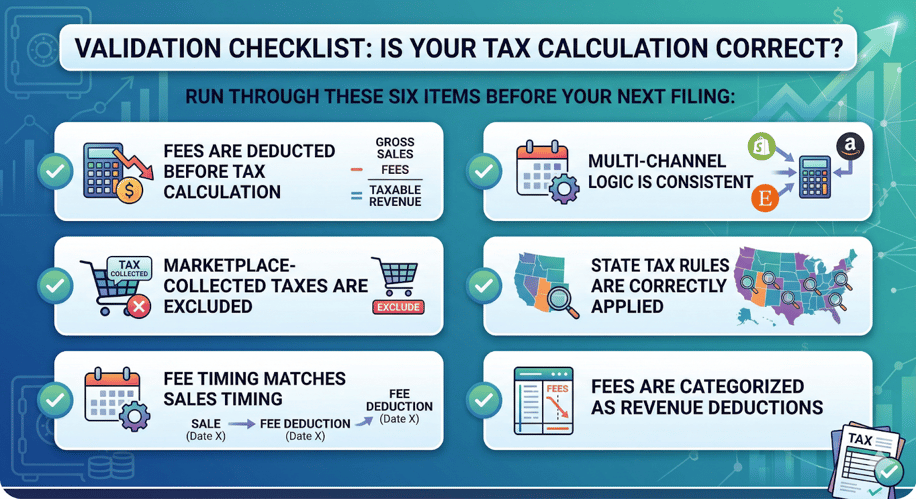
Validation checklist for accurate marketplace tax calculation before filing.
Fixing tax calculation requires system-level accuracy
When your system treats gross sales, fees, and marketplace-collected tax as if they all belong in the same bucket, tax calculation errors become almost inevitable. Having said, you’re either:
- Overpaying taxes
- Or exposing yourself to audit risks by creating gaps between your books, filings, and marketplace reports
The answer is not manual cleanup at month-end. It is a system that captures orders, fees, taxes, and payouts with the right context from the start, so your books reflect net revenue accurately and reconciliation is easier across every channel.
For multi-channel sellers, that is where accounting automation platforms make the biggest difference. Webgility helps connect that transaction-level detail to your accounting, so marketplace fees, tax treatment, and deposits are easier to track correctly before small errors turn into larger compliance problems.
FAQs
Should I pay taxes including marketplace fees?
You should only pay tax on net revenue (gross sales minus platform fees). Fees paid to marketplaces are deductible as direct sales deductions, reducing your taxable income, not just your operating expenses.
Can marketplace sales tax automation fail?
Yes. Most tools automate filing but not fee-adjusted tax calculation, which is where errors begin.
What are the hidden gaps when selling on multiple marketplaces?
Different fee structures, different tax handling rules, timing mismatches, and inconsistent reporting create compounding tax calculation errors.
.png?width=128&name=image%20(9).png)