.png?width=96&name=image%20(1).png)

Shopify + QuickBooks
If you are a D2C or scaling ecommerce business that offers gift cards as a sales channel or store-credits to handle returns, this one’s for you.
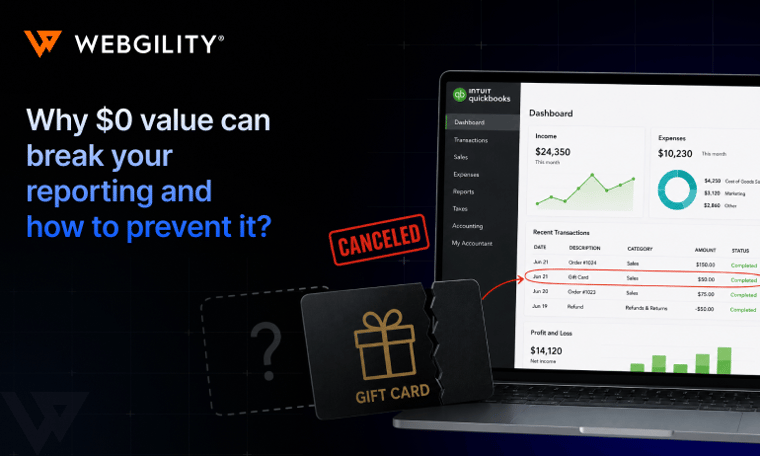
Every time a customer pays with a Shopify gift card in your store, your accounting system makes a decision. For most ecommerce businesses, that decision is wrong. And it's silently inflating your revenue numbers.
- Most connectors post gift card sales as revenue — they're not
- Gift cards are liabilities until redeemed
- Split payments make it worse
- Inflated taxable income — paying tax on money you haven't earned
- P&L shows revenue that doesn't reconcile to your bank
- Hidden balance sheet liability + possible escheatment exposure
- Year-end close pain
- Map
gift_cardpayment method to a Gift Card Liability account — not income - Takes ~20 minutes to configure
- Self-diagnose in under 10 min with the 3-check table below
- Shopify store owners who sell gift cards
- Bookkeepers cleaning up a Shopify → QuickBooks integration
- Anyone whose P&L doesn't reconcile to bank deposits
The problem, without accounting jargon:
Gift cards posted as sales revenue
You just counted the same $100 twice. And you have no gift card liability on your balance sheet.
Shopify treats gift cards as a payment method — no different than a Visa or PayPal in its data. Most connectors read that signal and post it as revenue. Which means when a customer buys a $100 gift card, your books see a $100 sale. Then when they redeem that gift card on an actual order, your books see another $100 sale. One transaction, two revenue entries.
Or didn't happen at all — because that $100 sale you booked when they bought the card? That's not income either. It's a liability. You have their $100, but you still owe them $100 in goods. It becomes revenue the moment they use it — not before.
Selling a gift card = creating a debt (liability), not earning income.
A gift card is only revenue when a customer uses it to buy something.
Until then, it lives on your balance sheet — not your P&L.
This is one of the most common accounting errors we see our customers struggle with. We were onboarding a new Shopify customer recently that had some serious accounting discrepancies. After a few hours of investigation, it turned out their previous connector had been posting gift card sales as revenue for 18 months. The fix required a retroactive journal entry and a conversation with their accountant. Not fun.
These issues happen more often than we'd like — over 97 customers in the last few months. And that's just the businesses who caught it.
Do you have this problem?
3 checks, under 10 minutes

Why this keeps happening:
Reasons your connector gets it wrong
Shopify records gift cards as a payment method. Most connectors treat payment methods as revenue. That's the entire bug.
What's more painful is Shopify's own analytics actually handles this correctly. Gift card sales are excluded from sales reports in Shopify's own dashboard. It's only when the data moves into QuickBooks via a connector that the mistake gets made.

Split payments make it worse. If a customer paid $90 with a gift card and $60 with a Visa on a $150 order, there are two separate payment legs in Shopify's data. Most connectors collapse those into a single entry.
"It was refunded in 2 parts — $51 to a gift card and $213.02 to a Visa card. However, I imported it as 1 refund for the total amount… why is this incorrect? Or should this have been downloaded as 2 separate refunds?"
— Webgility customerTwo payment legs collapsed into one. The gift card liability doesn't get relieved. The Visa payment doesn't get its own clearing entry. Both are wrong, and they compound.
What this costs you
Taxes, phantom revenue, and a liability you can't see
This isn't just a bookkeeping tidiness issue. Here's what broken gift card accounting does to your business:
If gift card sales are hitting your revenue, your taxable income is inflated. For a store doing $5,000/month in gift card sales, that's potentially $60,000/year of phantom income showing up on your returns.
When you look at last month's revenue, you can't tell what's real sales vs. gift cards sold. That means your margin calculations, inventory forecasting, and profitability picture are all wrong.
Every unredeemed gift card you've sold is money you owe to a customer. If it's not on your balance sheet, you don't know what you owe — and escheatment laws in most states require you to turn that money over to the state after a certain period.
Your bookkeeper or tax preparer will find this. The question is whether they find it in October (fixable) or in April after you've already filed (painful). Q4 gift card spikes — holiday season — make this worse every year.
How to fix gift card posting in Shopify and QuickBooks with Webgility
The accounting logic: 4 scenarios, each with a correct treatment
| Scenario | What Shopify shows | Correct accounting | Common mistake |
|---|---|---|---|
| Customer buys a $100 gift card | Payment received, product = gift card | DR Bank $100 · CR Gift Card Liability $100 · No revenue recognized. | Posting $100 to Sales Income. |
| Customer redeems $100 gift card in full | Order paid via gift_card payment method | DR Gift Card Liability $100 · CR Sales Income $100 · Revenue recognized now. | Posting $100 to Sales Income again (double-count). |
| Split: $90 gift card + $60 Visa ($150 order) | Single order, two payment entries | DR Gift Card Liability $90 · DR Clearing $60 · CR Sales Income $150 | Collapsing to one entry — liability doesn't clear, or Visa disappears. |
| Refund back to gift card | Refund, payment method = gift_card | DR Sales Income · CR Gift Card Liability · Liability reinstated. | Reversing only the order — liability never comes back. |

Configuring Webgility: one mapping change, everything flows correctly
Webgility handles all four scenarios — but the configuration has to be right. The fix comes down to one setting: your payment method mapping. The gift_card payment type needs to route to your Gift Card Liability account, not to Sales Income. Once that's set, Webgility handles everything else: liability creation on sale, liability relief on redemption, split-payment separation, and refund reinstatement.
If you're not sure whether yours is set up correctly, check: does a Gift Card Liability account exist in your QuickBooks Chart of Accounts? If not, create a Current Liability account named "Gift Cards Outstanding," then map your gift_card payment method to it in Webgility.
- Gift card sales post to liability — no P&L impact at time of sale
- Gift card redemptions relieve the liability and hit income
- Split-payment orders show two separate accounting lines
- Refunds to gift card reinstate the liability balance
- Shopify Gift Card Liabilities report and QB balance sheet match
Can I do the same with Discount Codes?
Discount codes aren't liabilities — they just reduce your selling price. But they create a specific posting failure that trips up a lot of stores. They deserve their own treatment.
But that's a whole other story we'll discuss next time 😀
Month-end checklist:
Gift cards & split payments done right
Print this or paste it into your close checklist.
Common questions
Gift card accounting in Shopify + QuickBooks
Glossary
Accounting terms, for Non-Accountant Operators
More questions answered: gift cards, store credit, and split payments
gift_card payment method in order data. The accounting treatment is identical.gift_card payment method shows up identically in your order data.Is your gift card accounting set up correctly?
Run the 3-check diagnostic above — takes under 10 minutes. If anything's off, Webgility fixes it with one mapping change.
See how Webgility handles this →.png?width=128&name=image%20(1).png)