|
TL;DR
|
You see a sale come in (cha-ching), inventory decrements, a product was shipped.
And then you notice the sales order didn't carry any revenue.
Key thing :
- "Business event" is real, but the "cash event" is not. How do you reconcile cash that you never received?
- Say you made a $100 sale with a $100 coupon. Net order value: $0. But did you have "no sale"? Or a "$100 sale & $100 marketing cost"?
- You need to know why it became $0: Coupon = Marketing expense; Gift card = Revenue was recognized months ago when the gift card sold; Store credit = Settles Accounts Receivable or another liability. Completely different GL postings.
- Marketplaces behave very very differently - order? replacement order? payment attached to receipt?
Now the headache starts. Accounting events and Commerce events don't match. One transaction - maybe you can trace it down. A dozen over 6 months? You have a bunch of fulfillments that give you margins and CAC that are wildly off.
Let's follow one order from checkout to QuickBooks and see why proper validation matters.
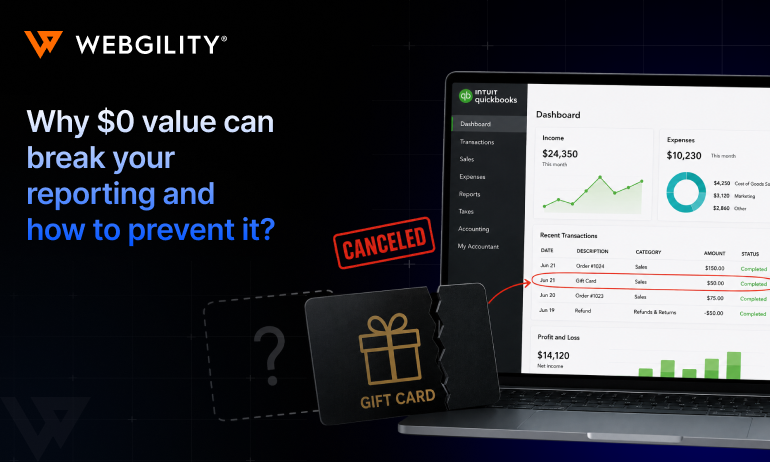
What is a $0 order value?
A $0 order (also called a zero-value order or zero-dollar transaction) is an ecommerce order where the customer pays nothing at checkout because the total has been fully offset by another payment, credit, or discount.
A $0 checkout doesn't mean nothing happened financially. The transaction may still include inventory movement, revenue, taxes, discounts, gift card redemptions, store credit, warranty replacements, employee or influencer orders, or, in some cases, missing payment data.
Most $0 orders are legitimate and require accurate accounting treatment. For example, a gift card redemption isn't revenue-free, it represents revenue earned while reducing a previously recorded gift card liability.
The real risk comes from $0 orders caused by incomplete or corrupted payment data. These can quietly distort revenue, inventory, liabilities, and financial reporting if they post to QuickBooks without validation.
Why automatically posting $0 orders to QuickBooks can create accounting errors
A $0 order isn't the problem. An unexplained $0 order is. Simply because QuickBooks records transactions, it doesn't validate them.
Many ecommerce connectors work the same way. Their job is to transfer data from Shopify, Amazon, Walmart, or another sales channel into your accounting system. If the source data is incomplete, the connector simply passes that incomplete data along.
Here's what the corrupted version costs you, in accounting terms:
|
Downstream effect |
What it looks like in your books |
|
Revenue understated |
The order was real, but $100 in sales never hit your income statement |
|
Gift card liability unrelieved |
An uncategorized redemption sits on your balance sheet forever |
|
Phantom COGS |
You shipped the candle set, so COGS posts, against income that never existed |
|
Corrupted SKU margins |
Your margin report for that candle set is quietly wrong, and so is every decision based on it |
|
Possible scenario: One order. Four broken numbers. Now scale it: at 5,000 orders a month with even 3% arriving as $0, that's 150 chances every month for revenue to go missing. |
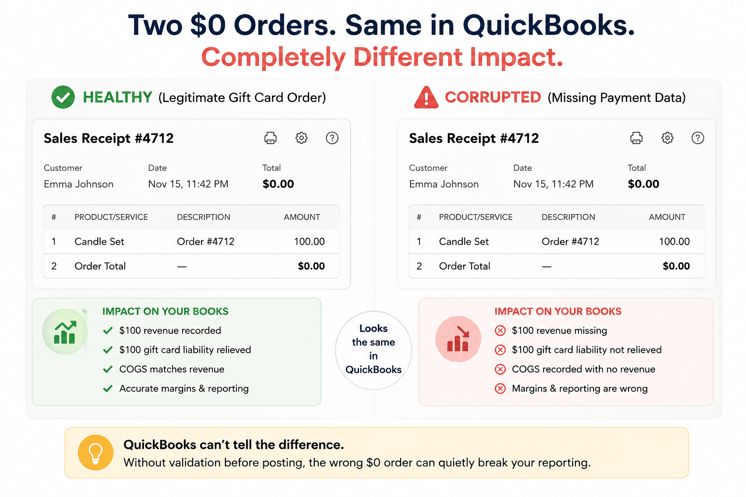
Meet Order #4712 (Example)
Order #4712 lands in your Shopify store. The customer purchased a $100 candle set. Now, the checkout total is $0.00.
Whether the order reaches QuickBooks through a connector, CSV import, or manual upload, it usually arrives looking exactly the same:
Order Total: $0.00
No warning. No validation. No indication whether it's correct.
But beneath that single number are two completely different accounting stories.
Different Types of $0 Orders (And Why They Need Different Accounting Treatment)
Below are the four most common scenarios, how a typical connector may process them, where things can go wrong in QuickBooks, and how Webgility helps ensure each transaction is handled correctly.
1. Gift card redemption (Legitimate)
What happens
A customer buys a $100 product using a gift card purchased last month.
|
Product |
$100 |
|
Gift Card |
-$100 |
|
Checkout Total |
$0 |
How a basic connector may treat it
Many generic connectors only see the final checkout amount.
Since the order total is $0, they may:
- Skip posting the order entirely, or
- Post it as a $0 sale without recognizing the gift card redemption.
What goes wrong in QuickBooks
Either approach creates accounting issues.
If the order is skipped:
- Revenue isn't recognized.
- Inventory isn't reduced.
- COGS isn't recorded.
- The gift card liability remains on the balance sheet even though it has been redeemed.
If it's posted as a $0 sale:
- Revenue may be understated or mapped incorrectly.
- The gift card liability isn't cleared.
- Inventory and accounting can fall out of sync.
Over time, financial reports no longer reflect what actually happened.
How Webgility handles it
Webgility doesn't evaluate the transaction based only on the checkout total.
It recognizes that the customer paid using a gift card, applies the appropriate accounting treatment, records the sale, relieves the gift card liability, updates inventory, records COGS, and posts the transaction correctly to QuickBooks.
2. Store credit redemption
How a basic connector may treat it
The connector sees:
Total = $0
It often ignores why the total became zero.
What goes wrong
If the store credit isn't mapped correctly:
- Customer credit liabilities stay open.
- Revenue may never be recognized.
- Outstanding credits become inaccurate.
- Customer balances no longer match reality.
How Webgility helps
Webgility understands that store credit is another form of payment, not the absence of a sale. It maps the transaction according to your accounting rules so revenue, inventory, and liabilities remain accurate.
3. Promotional / employee / warranty orders
How a basic connector treats it
Many connectors treat these exactly like normal sales because they only receive:
- Product
- Quantity
- Total = $0
They don't distinguish between a marketing giveaway and a customer purchase.
What goes wrong
The transaction may:
- Inflate sales reports
- Misclassify marketing expenses
- Distort customer revenue
- Create misleading SKU profitability
How Webgility helps
Webgility allows businesses to configure posting rules for special order types so these transactions can be categorized appropriately instead of being mixed with regular customer sales.
4. Missing or corrupted payment data (The dangerous one)
This is where the article becomes genuinely valuable because almost nobody explains this.
What happens
The customer purchases:
Product: $150
The sales channel fails to send payment information.
The connector receives:
Product = $150
Payment = NULL
Total = $0
How a basic connector treats it
Since there's no payment validation, it assumes the order is complete and posts it directly into QuickBooks.
It has no way of knowing the data is incomplete.
What goes wrong
QuickBooks now contains:
- Revenue with no valid payment source
- Uncleared payment accounts
- Deposits that never reconcile
- Incorrect clearing account balances
- Month-end reconciliation issues
- Manual investigation by accountants
The accounting team usually discovers the problem weeks later when payouts don't match.
How Webgility helps
Instead of blindly posting the order, Webgility validates the transaction before it reaches QuickBooks.
If critical information like payment mapping, transaction details, or accounting rules is missing or inconsistent, the order is flagged as an exception for review rather than being posted automatically.
This prevents incomplete or corrupted data from silently affecting financial reports.
Configuration steps in Webgility
- Go to Connections → Accounting/POS → Sync Settings → Optional Settings.
- Uncheck "Do not post orders with Zero amount."
- Save your settings.
- Sync the order again.
Check this article to understand and configure the “Don’t post orders with zero amount to QuickBooks” option.
What good ecommerce accounting looks like!
The strongest ecommerce accounting workflows don't simply synchronize orders from Shopify or Amazon into QuickBooks.
They answer a more important question first:
“Does this transaction contain everything needed to create an accurate accounting entry?”
If the answer is yes, the order can be posted automatically.
If the answer is no, it should be reviewed before it affects your books.
That distinction reduces manual reconciliation, improves financial accuracy, and gives finance teams greater confidence in their month-end close.
Webgility follows this validation-first approach by checking the accounting components behind every transaction before it reaches QuickBooks. Rather than relying only on the order total, it helps ensure that gift card redemptions, promotions, store credit, and other zero-dollar transactions are classified correctly.
If you want to see how pre-post validation handles your $0 orders before the next one posts unchecked, talk to our experts.
FAQs
Should gift card redemptions post as revenue?
No. Revenue was recognized when the gift card was sold. When it's redeemed, the entry should relieve your gift card liability account. Posting redemptions to revenue double-counts income and leaves phantom liability on your balance sheet.
Does blocking all $0 orders solve the problem?
Not really. Blocking everything means legitimate gift cards and promo orders never reach your books either, which understates revenue and leaves liabilities unrelieved. The goal isn't blocking $0 orders; it's classifying them before they post.
Can a $0 order still affect inventory?
Yes. Inventory usually decreases even when the customer pays nothing at checkout, so the accounting treatment still matters.