
.png?width=32&height=32&name=image%20(9).png)
 August 25, 2026
 6 min read
Contents


|
Key Takeaways:
|
Your tax settings were right when you set them up. The rules just did not stay that way.
Say you sell on Amazon and Shopify. Amazon collects sales tax in many states, but your Shopify settings are still charging tax there too. A customer in Texas buys from both channels and gets taxed twice. Now you owe a refund, a corrected filing, and an explanation.
That is how multi-state sales tax breaks: one mismatch turns into many. Across 15 states, 3 channels, and 50 SKUs, you are dealing with changing nexus thresholds, product taxability rules, exemption certificates, and marketplace facilitator laws. This post explains how to spot the problem early, what it is costing you, and how to fix it.
The first signs of multi-state tax trouble
Tax miscalculations hide until filing season. But there are early warnings if you know where to look.
- Double tax collection on marketplace orders. The marketplace collected tax AND your system charged tax. The customer paid twice. You owe a refund and an apology
- Tax collected in states where you have no nexus. Your tax engine is over-collecting because your nexus settings are out of date. You're remitting tax you didn't need to collect
- Exemption certificates not applied at checkout. A wholesale customer or reseller placed an order and got charged tax despite having a valid exemption certificate on file
- Product tax code mismatches. A product that's taxable in one state but exempt in another is being taxed everywhere, or nowhere. Your product tax codes don't reflect reality
- Filing amounts that don't reconcile with collected amounts. You collected $4,200 in sales tax for a state but your filing says $3,900. The gap is probably orders where the marketplace collected but your system also recorded it
If any of these look familiar, you're not dealing with a one-time error. You're dealing with a configuration problem that compounds every month.
Suggested Read: Discount, Shipping or Tax First? A Small Error with Big Tax Risk
Why these problems keep coming back
Multi-jurisdiction tax is genuinely hard. And the rules keep changing.
1. Marketplace facilitator rules are not truly uniform
Marketplace facilitator laws shift collection responsibility to the platform for marketplace sales, but they do not eliminate seller responsibility everywhere. Sellers are still responsible for direct sales outside the marketplace, and many states still require sellers to review registration and filing obligations.
2. Product taxability varies by state
Clothing is exempt in Pennsylvania but taxable in Ohio. SaaS is taxable in Washington but not in California. Your tax engine needs product-level, state-level rules, not a blanket setting.
3. Economic nexus thresholds trigger mid-year
You might not have nexus in a state in January but cross the threshold by June. Now you owe tax retroactively on every order placed after you crossed the line.
4. Multi-channel selling means each platform handles tax differently
Amazon handles facilitator tax automatically. Shopify depends on your settings. Your own website is entirely on you. There's no universal default.
5. Exemption handling is often manual and fragile
Exemption certificate rules vary by state, certificates can expire, and the wrong certificate can be treated the same as having no certificate at all. Sellers can become liable for uncollected tax if documentation is missing or invalid.
Suggested Read: How to Stay Ahead of Nexus Rules by State
What this is actually costing you
Getting tax wrong isn’t just an accounting problem. It’s a legal one.
-
Double-collected tax means customer refunds, trust damage, and potential legal exposure depending on your state obligations
-
Under-collected tax means you owe the difference out of pocket when you file, plus potential penalties and interest
-
Nexus violations can result in back-taxes, penalties, and interest from states you didn't even know you had obligations in, sometimes dating back years
-
Audit risk increases with every inconsistency between what you collected, what the marketplace reported, and what you filed. Each discrepancy is a flag
None of this shows up on your dashboard. It shows up in your tax filing, or in a notice from a state revenue department
What it takes to fix this manually
If you want to audit and fix your multi-state sales tax configuration manually, here's what that actually looks like. It's a spreadsheet marathon, but it's doable.
1. Map your nexus. Document every state where you have physical or economic nexus. Update quarterly as your sales volume changes.
2. Audit marketplace facilitator settings per channel. For each marketplace, verify which states they're collecting tax in. Turn off your own tax collection for those states on those channels.
3. Review product tax codes. Go through your top 50 SKUs and verify the tax code assigned to each. Check against the states where you sell for accuracy.
4. Reconcile collected vs. filed quarterly. Pull tax collected from each channel and compare against what you filed in each state. Investigate any gap over $50.
5. Update exemption certificates. Check that all valid exemptions are loaded into your tax engine and applied at checkout. Expired certificates should be flagged and renewed.
It works if you stay on top of it every quarter. The real risk is the maintenance burden as you add channels, SKUs, and states.
How automation simplifies sales tax
Sales tax gets harder to manage as you add more channels, states, and tax rules. Automation matters because it helps keep order data, tax treatment, and accounting records aligned without relying on manual fixes every month.
That’s where Webgility fits in. It helps bring multichannel order and tax data into your accounting system more accurately. Moreover, with this tool you get:
- Accurate tax sync to QuickBooks
Syncs clean order and tax data across channels into QuickBooks.
- Avalara integration
Supports AvaTax for automated tax calculation and validation.
- Tax mapping support
Helps map product tax codes and tax settings more accurately.
- Nexus monitoring
Track your sales volume per state against economic nexus thresholds.
- Marketplace-collected tax adjustments
Automatically identifies marketplace-collected tax and records it correctly.
- Exempt customer handling
Supports tax-exempt customer workflows to reduce miscoding.
- Better reconciliation
Keeps tax liability and bank reconciliation more accurate.
- Multi-channel threshold visibility
Helps monitor sales activity across states and channels.
Suggested Read: How to Set up Sales Tax in Webgility Online for QuickBooks Online
More control over sales tax posting in QuickBooks Online Canada
Getting the sales tax amount right is one part of the job. How that tax is recorded in QuickBooks matters too.
For businesses using QuickBooks Online Canada, Webgility now provides the option to record sales tax as a separate line item instead of recording it only in the default tax field.
This gives Canadian ecommerce businesses more control over how tax appears in their books and makes it easier for accounting teams to identify and review sales tax amounts separately from the order subtotal.
With this option, businesses can:
- Keep sales tax clearly separated from order amounts
- Make tax amounts easier to identify and review in QuickBooks
- Follow their preferred bookkeeping structure
- Reduce manual adjustments after orders reach QuickBooks
It also brings QuickBooks Online Canada closer to the sales tax posting flexibility already available to Webgility customers using QuickBooks Online US.
How to record sales tax as a separate line item
- Log in to Webgility Online.
- Open the settings for your QuickBooks Online Canada connection.
- Navigate to your sales tax settings.
- Enable the option to record sales tax as a separate line item.
- Configure the appropriate tax item or mapping for your accounting setup.
- Save the settings before posting your next orders.
Once configured, Webgility can record the sales tax separately when eligible ecommerce orders are posted to QuickBooks Online Canada.
Real story: FlatSpec
FlatSpec sells eyewear across Amazon and Shopify. Before Webgility, every order sync was manual, reconciliation was a guessing game, and they needed multiple staff just to keep up. After automating with Webgility, they eliminated three staff positions, saved tens of thousands annually, and closed their books cleanly every month.
"Webgility works in the background reconciling sales across platforms and bringing it all into QuickBooks. It's freed me to focus on growth, not manual data entry." - Steven Silverstein, President
The key to keeping sales tax from breaking again
Double-collected tax costs you customer trust. Under-collected tax costs you money at filing. Missed nexus costs you in back taxes and penalties. None of it shows up until it's already expensive.
Stop guessing what you owe across 15 states and 3 channels. Webgility goes beyond sync; it gives you the visibility, the automation, and the filing-ready reports to get it right, every month.
And because tax breaks quietly, through settings that stopped being right, automation alone isn't the answer. Webgility pairs it with people: specialists review and certify your books every month through our Human-Verified Close, so drift gets caught in a review instead of an audit notice.
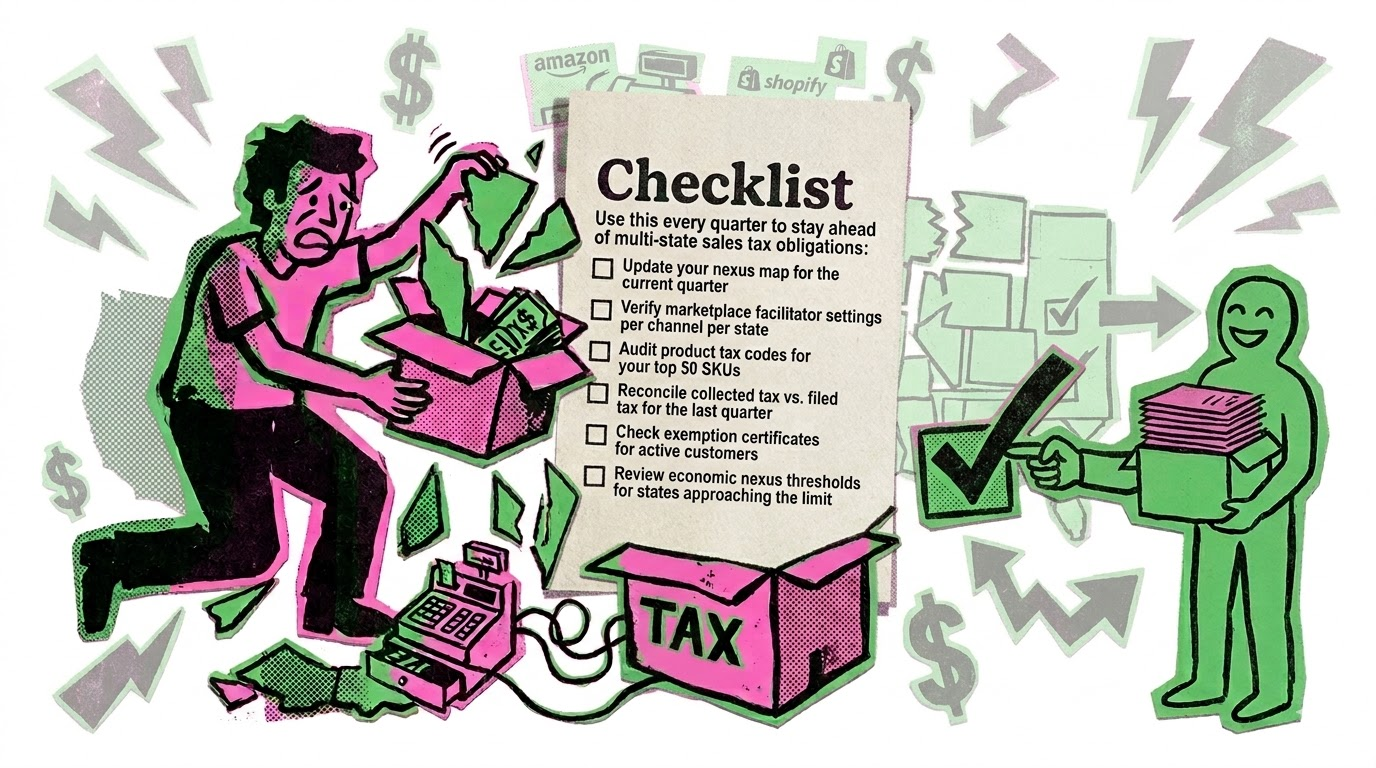
A simple quarterly checklist can turn multi-state sales tax from scattered guesswork into a cleaner, more manageable process.
FAQs
If Amazon collects tax for me, why do I still need to file?
In most states, you’re still required to file a return showing the marketplace-collected tax. You may owe $0, but the filing obligation remains.
How do I know if I have economic nexus in a new state?
Track your rolling 12-month sales volume per state. Most thresholds are $100K in sales or 200 transactions. Several tax engines provide nexus monitoring dashboards.
What happens if I’ve been double-collecting tax?
You’ll need to refund the over-collected amount to affected customers and adjust your filings. Start by identifying the overlap period and affected orders.
.png?width=56&height=56&name=image%20(9).png) Nikita Sikri
Nikita Sikri


-2.webp)
.png?width=24&height=24&name=image%20(1).png) Yash Bodane
Yash Bodane

-3.png)