.png?width=96&name=image%20(1).png)
|
TL;DR
|
You close a strong sales week. Your store shows $12,400 in revenue, but when the payout lands, your bank only shows $9,800. No obvious explanation. No clean one-to-one match. Just a gap.
That gap is where payment delays start causing real problems.
In ecommerce, what your customer pays, what your platform records, and what finally hits your bank account often happen on different timelines.
This is not a glitch. It is how payment processing actually works. And for ecommerce businesses operating across Shopify, Amazon, PayPal, or any combination of platforms, payment delays and partial payouts are not edge cases. They are the norm.
This guide explains why payment delays happen, what gets subtracted before you are paid, why multi-channel settlement makes reconciliation harder, and what to do about it so your books reflect what actually happened.
What is a settlement period and why does it create payment delays?
A settlement period is the time between when a customer's payment is authorized and when the funds actually land in your bank account. It is not instant. Every transaction passes through a chain: payment processor, then platform, then your bank and each hop adds time.
The critical distinction most sellers miss: the transaction date and the settlement date are not the same thing.
|
For example- A sale made on November 28 may not settle until December 2. If your books treat the deposit date as the revenue date, you already have a timing error. |
Five main reasons payment delays occur:
- Settlement cycles vary by platform, country, payment processor, and industry risk level
|
For instance- Shopify says many merchants see a minimum settlement time of around 2–3 business days depending on region, while Stripe says settlement timing varies (may take 7-14 days), depending on industry risk level and country of operation. |
- Weekends and bank holidays extend payout timing, sometimes by two to three days
- Refunds and chargebacks reduce future payouts rather than reversing the original transaction
- Reserve holds and risk reviews can delay funds for days, weeks, or months for newer accounts
- Multiple transactions are bundled into a single net deposit, making individual-order matching difficult
Typical settlement timelines by platform
|
Platform |
Settlement Frequency |
Typical Payout Delay |
Notes |
|
Shopify Payments |
Daily, weekly, or monthly, depending on settings/location |
Usually 1–3+ business days after processing; varies by country |
Faster access may be available with Shopify Balance; ACH/direct debit and country rules can affect timing. |
|
Amazon |
Typically every 14 days |
Often a 14-day rolling disbursement cycle |
Account-level reserves, claims, chargebacks, and new-seller risk reviews can delay funds. |
|
Stripe |
Daily, weekly, monthly, or manual, depending on account settings |
Commonly 2–3 business days in many cases, but varies by country/industry/account |
First payout can take longer; Instant Payouts may be available for a fee and can arrive much faster. |
|
PayPal |
Manual withdrawal / transfer to bank |
Typically 1–3 business days for standard bank transfers |
Instant transfer may be available for a fee; holds are common for newer or higher-risk accounts. |
|
Etsy |
Daily, weekly, biweekly, or monthly; weekly is common/default for new sellers |
Often 3–5 business days after funds are sent to bank, depending on bank/country |
Deposit minimums, reserves, and bank-account changes can affect timing. |
|
WooCommerce / WooPayments / Stripe |
Depends on gateway and payout schedule |
Often 2–7 business days, depending on gateway, country, and account status |
WooCommerce is the storefront; settlement is handled by WooPayments, Stripe, PayPal, Square, etc. |
For multi-channel sellers managing these separate settlement cycles from distributed environments, maintaining secure access to various payment gateways via a vpn chrome extension has become a standard operational practice to protect sensitive session data.
The real cost of payment delays for ecommerce businesses
The obvious cost of payment delays is slower cash access. The bigger cost is that they distort financial visibility.
1. Cash flow planning breaks
When you cannot predict when funds arrive, you cannot confidently reorder inventory, plan ad spend, or time supplier payments. Decisions get made on assumptions instead of facts.
2. Month-end close gets messy
Revenue recorded in one period, fees posted in another, and deposits that land in a third period create timing mismatches that take hours to untangle. Multi-channel sellers managing 4 to 6 settlement cycles simultaneously are especially exposed.
3. Revenue recognition compound tax errors
Sales booked in Q4 that settle in Q1 create real tax-period mismatches. If you record income when the deposit hits rather than when the sale occurred, your financials are systematically off.
4. Fee leakage goes unnoticed
Platform fees, refund adjustments, and reserve holds quietly reduce your payouts. Most sellers never track the delta between what they expected to receive and what they actually did which means they never know if something changed.
|
Fact check: A seller running Shopify, Amazon, and Etsy simultaneously has three different settlement calendars, three different fee structures, and potentially three deposits arriving in the same week, each representing sales from different time periods. |
That is exactly where basic sync tools tend to break:
A basic connector may move summary data from one system to another, but it often stops at totals. It can show sales, deposits, or a daily summary, yet it does not fully explain why gross sales and net payouts differ once fees, refunds, chargebacks, reserves, and timing gaps are involved.
Here’s the solution:
Tools like Webgility help close that gap by syncing both summary-level and transaction-level data into your accounting system with more context. At the summary level, it helps keep deposits, payouts, and accounting totals aligned. At the transaction level, it brings in the detail behind those numbers, including orders, fees, taxes, refunds, and adjustments, so teams can see exactly why a payout does not match gross sales.
How to manage payment delays and partial payouts manually
If you are in the early stages of scaling or operating on one or two channels, a manual workflow can work. Here is a four-step framework that gives you visibility without automation:
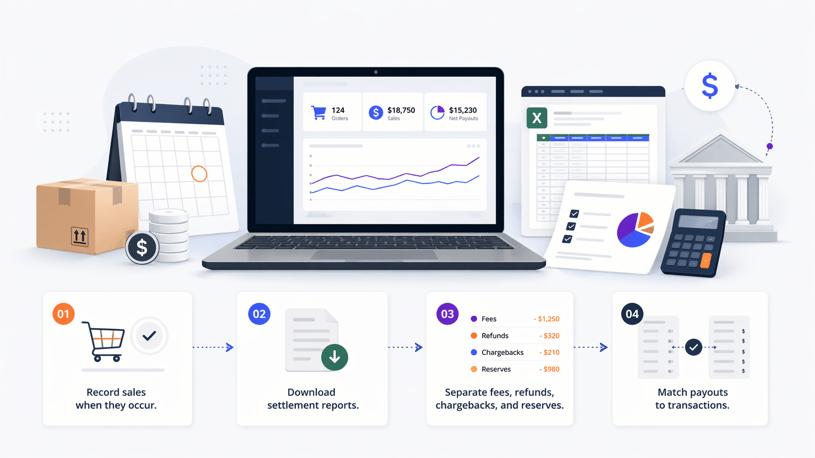
A step-by-step view of how businesses can manually track sales, settlement reports, deductions, and net payouts across settlement periods.
Step 1: Record sales when they occur, not when cash hits
Post revenue at transaction date in your accounting system. Do not wait for the deposit. This is the foundation of accurate revenue recognition and the only way to separate income from cash flow.
Step 2: Download settlement reports daily or weekly
Every major platform provides a settlement or transaction report. Amazon calls it the Settlement Report. Shopify calls it the Payouts report. These reports are your source of truth for what was actually paid, what was deducted, and which orders are included.
Step 3: Break out fees, refunds, chargebacks, and reserves separately
Do not book a payout as a single line item. Every deposit should trace back to a formula:
Gross sales – Fees – Refunds – Chargebacks – Reserves = Net payout
When you don’t post lump-sum deposits, reconciliation becomes quick and easy. Furthermore, matching each payout to the orders, fees, and adjustments will bring more clarity you need to grow your business.
Step 4: Build a payout variance log
Track expected versus actual payouts month by month. After three to four months, patterns emerge: fee increases, changes to reserve calculations, or new deduction categories you had not accounted for. This log is also invaluable at tax time and during any financial audit.
Schema recommendation: add HowTo schema markup to this section. Steps with clear labels are the most-extracted format by Google's AI Overviews.
Why manual payout tracking stops working as you scale
Manual processes can work at low volume. They do not stay reliable at scale. This is where you transition from advice to the need for automation.
- More channels mean more payout schedules
- More payment methods mean more timing differences
- More refunds and partial settlements mean more exceptions
- More orders mean more reconciliation work instead of analysis
Ecommerce accounting that goes beyond sync doesn't just move numbers, it explains where the money went. Fees, refunds, reserves, and timing included. So you're not guessing at month-end.
Suggested read: How Manual Orders Break Accounting Sync and Tax Accuracy
What an automated payout reconciliation workflow should do
A useful automated workflow should do five things well.
It should sync settlement data, not just orders. It should map fee categories automatically. It should match payouts to bank deposits. It should track partial payouts across accounting periods. And it should surface discrepancies before month-end, not during it. Those are the exact requirements in your blog brief.
That is also where Webgility fits naturally as:
- Webgility syncs orders, payouts, fees, refunds, and adjustments into QuickBooks with context
- It helps explain why a net deposit differs from gross sales
- It maps deductions properly so finance teams are not chasing missing money
- It flags mismatches early so delayed payouts do not turn into close-week surprises
Turn payment delays into a reliable reconciliation workflow
Delayed payouts are normal in ecommerce. Unexplained payouts are not. The real risk is not waiting a few days for cash. It is losing visibility into what was paid, what was withheld, and what period it belongs to.
When orders, fees, refunds, and payouts all hit on different timelines, your books need more than a basic sync. Webgility helps ecommerce businesses reconcile deposits accurately, explain every payout, and keep your books aligned with what actually happened.
Webgility connects multichannel sales data with QuickBooks to simplify order management and reconciliation.
If your books are still a version of what your store earned rather than what you actually made, it is worth looking closely at how your payouts are being reconciled. The gap between those two numbers is not just a math problem. It is a visibility problem and it is solvable.
FAQs
Why are my ecommerce payouts delayed?
Payout timing depends on processor settlement cycles, payment method, weekends, holidays, risk reviews, and whether refunds or chargebacks reduced the amount.
Why is my payout less than my sales total?
Because payouts are usually net of processing fees, refunds, chargebacks, reserves, and other adjustments. Shopify explicitly notes that some transactions such as refunds and chargebacks can reduce payout amounts.
How do I reconcile partial payouts in QuickBooks?
Record sales when they happen, then match the later payout to the related transactions and deductions separately. At scale, automation is more reliable than spreadsheets.
Can payment delays affect month-end close?
Yes. If sales, fees, and deposits fall into different periods, finance teams end up with timing mismatches, manual adjustments, and slower close cycles.
.png?width=128&name=image%20(1).png)