
.png?width=32&height=32&name=image%20(9).png)
 June 27, 2026
 5 min read
Contents


|
Key Takeaways:
|
A customer emails on a Tuesday. They returned a jacket two weeks ago, and their refund still hasn't shown up. You check your ecommerce platform, it shows the refund as processed. You check your payment processor, no record of it going out.
Meanwhile, a colleague who wasn't aware the case was already being handled processes it again. Now the customer gets refunded twice, your books are off, and you're spending the next hour untangling a problem that a better workflow would have prevented entirely.
This isn't a rare edge case. For many ecommerce merchants running multi-platform operations, refund delays and duplicates have quietly reached crisis levels, hitting the business from every direction at once: operations, accounting, and customer trust.
Here's how to spot the warning signs, understand the root causes, and build the workflows that actually fix it.
The warning signs you shouldn't ignore
By the time you notice something is wrong, it's usually already compounding. Watch for these signals:
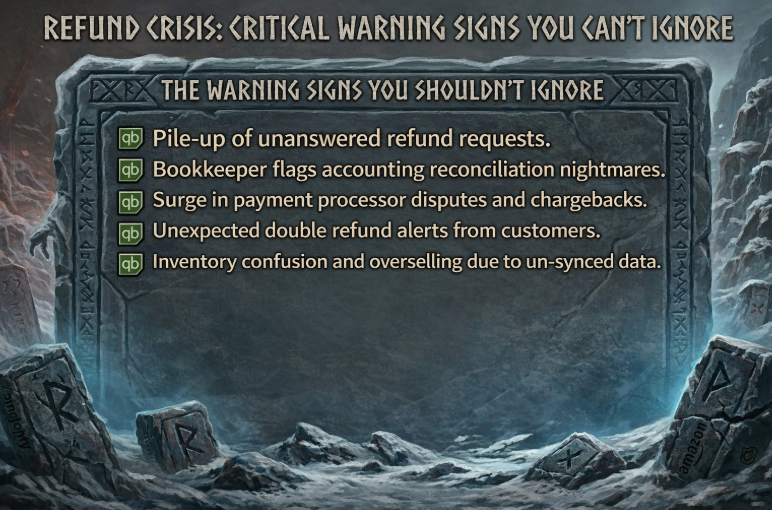
1. Refund requests piling up unanswered
Multiple daily inquiries about refund status, with customers reporting they were told 5–7 days but it's been two weeks or more. This is often the first sign that your process has broken down somewhere between request submission and payment processor execution.
2. Accounting reconciliation nightmares
Your bookkeeper flags duplicate refund entries, or refunds that appear in your ecommerce platform but don't show up in QuickBooks. When operational truth and financial truth don't agree, something is wrong.
3.Payment processor disputes
Customers filing chargebacks because they assume you've ignored their refund request. You haven't, but your silence has made you look like you have.
4. Double refund alerts
Customers contacting you to report they received their money back twice, or your bank statement showing unexpected outgoing payments with no clear matching order.
5. Inventory confusion
Products showing as refunded in your store but stock levels not updating, leading to overselling, fulfillment errors, and COGS figures you can't trust.
Suggested Read: Why QuickBooks Inventory Quantity Doesn't Match Shopify
Why refund delays and duplicate refunds happen
Most refund errors aren't caused by carelessness. They're what happens when manual workflows meet multi-platform operations, and the cracks start to show.
Specifically:
- Manual data entry between platforms creates lag time and introduces human error at every handoff
- No centralized refund status tracking means one team member can process a refund that a colleague already handled, with no visibility into what's been done
- Payment processor delays aren't communicated back to customer service, so your CS team gives customers timelines they can't actually back up
- Partial refunds and store credit options create workflow confusion, especially when your team hasn't been trained on how to handle edge cases
- Rush processing during busy periods leads to skipped verification steps when speed feels more urgent than accuracy
The system isn't broken. It was never built for this level of complexity in the first place.
Why refund problems damage more than operations
The financial and reputational damage from refund processing problems compounds quickly:
|
Cost type |
What it is |
Estimated impact |
|
Double Refund Loss |
Customer refunded twice due to processing error |
Direct cash loss with no recovery |
|
Chargeback Fees |
Bank-initiated reversal when customer disputes a delayed refund |
$15–25 per dispute + lost merchandise |
|
CS Labor Increase |
Extra time spent handling refund inquiries during crisis periods |
Up to 40% increase |
|
Accounting Cleanup |
Bookkeeper time spent reconciling duplicate or missing refund entries |
Hours per month-end close |
|
Lost Customer LTV |
Frustrated customers who don't return after a poor refund experience |
High- hard to quantify, harder to recover |
|
Conversion Rate Drop |
Negative reviews mentioning poor refunds suppress new buyer confidence |
Ongoing revenue impact |
The harder costs are the ones that don't show up on a P&L. Frustrated customers who don't return. Negative reviews that specifically call out poor refund experience and quietly suppress your conversion rate. Trust, once damaged, is expensive to rebuild.
Emergency cleanup: How to stabilize now
If your team is already dealing with refund chaos, the first priority is to create structure. You may not be able to fully automate everything overnight, but you can reduce damage quickly by putting a few controls in place:
- Create a refund status dashboard. A shared spreadsheet or project management tool that tracks every open refund request, submission date, assigned owner, current status, last update. Everyone on your team needs visibility into what's been touched and what hasn't
- Implement a double-check protocol. Require two-person verification before processing any refund over $25. Both parties sign off on the amount and payment method. This is a manual safeguard, not a permanent solution, but it will prevent duplicates while you build something better
- Run daily reconciliation. Every morning, compare refunds processed in your ecommerce platform against your payment processor records. Catching discrepancies within 24 hours is dramatically easier than untangling them at month-end
- Set up customer communication templates. Send status updates at 24 hours, 72 hours, and 7 days from request submission. Most "where's my refund?" inquiries are really "nobody has told me anything" complaints. Proactive communication cuts your support volume significantly
- Implement a rush order freeze. During high-volume periods, put a 4-hour hold on all refund processing to allow for proper verification. Panic-driven shortcuts are where most double refunds originate
Suggested Read: Ecommerce Brands Biggest Mistakes During BFCM (And how to avoid them)
The systematic fix: Automated refund management
Manual controls help, but they are not the real solution. Sustainable refund management requires automation that connects your ecommerce operations, payment processing, inventory, and accounting records.
Here is what that should look like:
1. Unified refund sync across all platforms
Webgility automatically syncs refund activity between your ecommerce platform, QuickBooks, and your payment processor. A refund initiated in Shopify or Amazon posts to your books correctly, with the right amounts, mapped to the right accounts, without manual intervention.
2. Exception-first handling for complex refunds
Partial refunds, timing mismatches, and multi-channel edge cases are where generic connectors break down. Webgility is built to handle these exceptions natively, so complexity doesn't turn into a spreadsheet fire drill at month-end.
3. Explained payouts and fee reconciliation
When a payout hits your bank, Webgility reconciles it against your sales, fees, refunds, and chargebacks, so deposits actually make sense in QuickBooks. No more staring at a number that doesn't match and not knowing why.
4. Real-time inventory accuracy
Refund processing automatically updates inventory levels across all your sales channels, keeping COGS and margins aligned. If a returned item is back in stock, your books know immediately, not at your next manual sync.
5. Faster, predictable close
Because refunds and exceptions are handled automatically and surfaced early, your books stay close-ready throughout the month
Real-world results: Navy Hair Care
Navy Hair Care's team was spending 3–4 days a month manually reconciling orders, payouts, and inventory across Shopify and QuickBooks. After switching to Webgility, that entire process became automated, reducing days of work to a background task.
Their COO summed it up: automation meant no more worrying about manual entry or errors, freeing the team to focus on what actually matters.
Stop Guessing. Start Closing Clean.
Remember that jacket return from the intro, one refund, two payments, an hour of cleanup, and a customer who almost lost trust in your brand. That's not bad luck. That's what happens when your store, your accounting, and your payment processor are each telling a different story.
The fix is going beyond sync. Webgility connects your commerce reality to financial truth so refunds and exceptions handle themselves, before they compound.
Stop guessing what went wrong. Start knowing, before it compounds.
FAQs
What should I do if I accidentally issued a double refund?
Contact the customer immediately to explain the error and request return of the duplicate amount. Most customers are honest about reporting overpayments. If they don't respond, you can dispute it with your payment processor.
Can I automate refunds without losing control over the process?
Yes, by setting up approval workflows for refunds over certain amounts or with specific characteristics. Full automation works well for standard returns, while complex cases can still require manual review.
How do I handle refunds for orders with multiple sales channels?
Use integration software that understands cross-channel inventory and can properly allocate refunds back to the original sales channel while updating inventory across all platforms.
.png?width=56&height=56&name=image%20(9).png) Nikita Sikri
Nikita Sikri


.png?width=24&height=24&name=image%20(9).png) Nikita Sikri
Nikita Sikri

